Wizard Control
Description
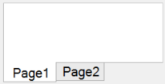
The wizard control is used to create screens in wizard format.
The wizard control can be used in the Standard and Premium editions.
Usage
Multiple pages can be added on to the wizard control.
During Design:
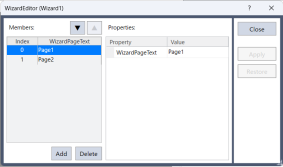
- Click the WizardEditor property to open the [WizardEditor] dialog.

- Add the desired page and set properties to the desired value.
- Close the dialog.
- Layout an optional control for each page and set properties to the desired value.
During runtime:
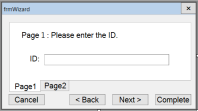
- Use the SelectedIndex property to switch the displayed pages.
Example: layout the “back” and “next” button control and set the SelectedIndex property with the Click event.
'The Click event function for the back button
Function frmWizard_btnBack_Click(Sender$ As String)
	'Display previous page
	Integer index
	GGet frmWizard.Wizard1.SelectedIndex, index
	index = index - 1
	GSet frmWizard.Wizard1.SelectedIndex, index
Fend

'Click event function for the next button
Function frmWizard_btnNext_Click(Sender$ As String)
	'Display next page
	Integer index
	GGet frmWizard.Wizard1.SelectedIndex, index
	index = index + 1
	GSet frmWizard.Wizard1.SelectedIndex, index
Fend
Wizard Control Property
| Property | Description |
|---|---|
| BackColor | Sets the background color for the control. Default: Window |
| Enabled | Sets whether the control is enabled. Default: True |
| EventTaskType | Sets the type of task used for events. Default: Normal |
| Height | Sets the height of the control in pixels. |
| Left | Sets the left coordinate of the control in pixels. |
| Name | Sets the name of the control. Default: WizardXX |
| SelectedIndex | Get and set the number of the selected item. (Only available from SPEL+ programs) |
| ShowNavigators | Set whether to display the header that can switch pages. (Reflected only for displaying in the design area) |
| TabIndex | Sets the tab index of the control. |
| ToolTipText | Sets the text used in the control's tool tip. Default: Empty |
| Top | Sets the top coordinate of the control in pixels. |
| Visible | Sets whether the control is visible or not. Default: True |
| Width | Sets the width of the control in pixels. |
| WizardEditor | Displays the wizard editor screen for adding, removing, and rearranging tabs. |
Wizard Control Events
| Event | Description |
|---|---|
| Click | Executes when the user clicks the control with the mouse. |
| SelectionChanged | Executes when the selected tab page is changed. |