CP Statement
Sets CP (Continuous Path) motion mode.
Syntax
(1) CP { On | Off}
(2) Motion instruction Endpoint CP
Parameters
- On | Off
-
- The keyword On is used to enable path motion.
- The keyword Off is used to disable CP mode.
Description
When path motion is enabled, consecutive motion commands are overlapped to synthesize the trajectory.
Pass motion is used in the following instructions.
- CP motion: Arc, Arc3, Jump3, Jump3CP, JumpTLZ, Move
- PTP motion: Go, Jump
When path motion is enabled by CP On, trajectory synthesis is performed regardless of whether each motion command has CP parameters or not.
Even when path motion is disabled by CP Off, trajectory synthesis with the trajectory of the next motion command is performed if CP parameters are specified in each motion command.
Normal Motion
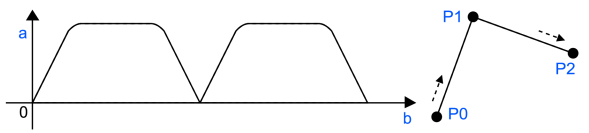
Path Motion
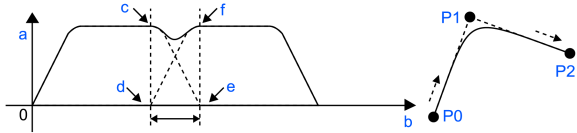
| Symbol | Description |
|---|---|
| a | speed |
| b | time |
| c | Preceding command: Start deceleration |
| d | Following command: Start acceleration |
| e | Preceding command: Deceleration completed (stopped) |
| f | Following command: Acceleration completed (specified speed reached) |
If consecutive motion commands are of the same type (CP motions or PTP motions), trajectory synthesis is performed according to the path motion settings.
If they are of different types (a CP motion and a PTP motion), synthesis does not occur and the robot decelerates once, regardless of the path motion settings.
However, if the controller environment setting "Enable CP - PTP connection when CP is On" is enabled, synthesis is performed.
In a CP motion whose target is a wrist singular point in a vertical 6-axis robot (including the N series), path motion is disabled, the trajectory of the next motion will not be synthesized, and full deceleration will occur.
Motion commands that use Here are not subject to path motion and do not perform trajectory synthesis. The robot decelerates once before executing such commands.
If used as shown below, the robot decelerates and stops at P1, and then starts the next motion.
    Go P1 CP
    Go Here+X(100)
If you want to avoid stopping, pre-calculate the position of Here.
    Go P1 CP
    Go P1+X(100)
Path motion is disabled (CP Off) in the following cases.
- Controller Startup
- Motor On
- SFree, SLock, Brake
- Reset or Reset Error is executed
- Task end by STOP switch or Quit All
Trajectory synthesis is performed based on whichever of the following has the shorter time.
- From the start of deceleration of the preceding motion command to a stop
- From the start of the next motion command to reaching the specified speed
From the start of deceleration of the preceding motion command to a stop
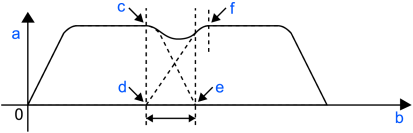
From the start of the next motion command to reaching the specified speed
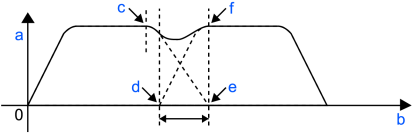
| Symbol | Description |
|---|---|
| a | speed |
| b | time |
| c | Preceding command: Start deceleration |
| d | Following command: Start acceleration |
| e | Preceding command: Deceleration completed (stopped) |
| f | Following command: Acceleration completed (specified speed reached) |
Depending on the acceleration/deceleration setting, an overspeed or overacceleration error may occur. In that case, adjust the acceleration/deceleration rate or disable it.
See Also
CP Function, Arc, Arc3 Statements, Go Statement, Jump Statement, Jump3, Jump3CP Statements, JumpTLZ Statement, Move Statement
CP Statement Example
CP On
Move P1
Move P2
CP Off