[Robot]
Settings related to 3D display of the robot.
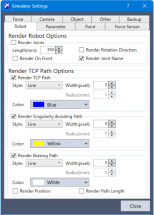
Render Robot Options
| Item | Description |
|---|---|
| Render Joints | Displays an arrow that shows a supporting point and a rotation axis of the robot. |
| - Length | Set a length for rendering the joints. |
| - Render Rotation Direction | Display a rotation direction when rendering the joints. |
| - Render Joint Name | Display the joint names (J1, J2, J3, J4, J5, J6) when rendering the joints. |
| - Render On Front | Display the arrow of "Render Joints" in front of the robot. |
Render TCP Path Options
| Item | Description |
|---|---|
| Render TCP Path | Displays the path of the origin point on active Tool coordinate system for a fixed time. |
| Render Singularity Avoiding path | Only displays the path of operation to avoid render singularity for the path of the origin point on active Tool coordinate system. |
| Render Braking Path | Displays only the motion trajectory when an error occurs in the path of the origin point of an active tool coordinate system. The display is available only with Epson RC+ Standard Edition and Premium Edition. The accuracy and precision of the trajectory displayed by this function are not guaranteed. Depending on the error, the trajectory may not be displayed or may be distorted. When applying this to an actual system, be sure to check its operation in combination with an actual robot. Also, add a margin if necessary. |
| Style | Select line or dot to indicate the paths. The setting is available only with Epson RC+ Standard Edition and Premium Edition in render braking path. |
| Width | Specify the line width of paths. The setting is available only with Epson RC+ Standard Edition and Premium Edition in render braking path. |
| Radius | Specify the diameter of dots indicating paths. The setting is available only with Epson RC+ Standard Edition and Premium Edition in render braking path. |
| Color | Specify the color of paths. The setting is available only with Epson RC+ Standard Edition and Premium Edition in render braking path. |
| Render Position | When displaying the render braking path, the start and end points of the trajectory can be displayed as X, Y, and Z values in simulator World coordinates. The display is available only with Epson RC+ Standard Edition and Premium Edition. |
| Render Path Length | Displays the length of the path in render braking path. The display is available only with Epson RC+ Standard Edition and Premium Edition. |