Weight and Inertia Settings
To ensure optimum Manipulator performance, set the load (weight of the hand and workpiece), moment of inertia of the load, and eccentricity correctly.
These settings optimize the Manipulator's PTP motion, reduce vibration, and shorten operation times. This also works to curb any persistent vibration that may occur when the hand and workpiece have a large moment of inertia.
You can also perform settings using the "Weight, Inertia, and Eccentricity/Offset Measurement Utility."
For details, refer to the following manual:
"Epson RC+ User's Guide - Weight, Inertia, and Eccentricity/Offset Measurement Utility"
Weight Setting
CAUTION
- The total weight of the hand and the workpiece must not exceed 1 kg (3-axis specification: 1.5 kg). The GX1 series Manipulators are not designed to work with loads exceeding 1 kg (3-axis specification: 1.5 kg). Always set the value according to the load. Setting the hand weight parameter to a value smaller than the actual weight may cause errors or impact that not only impair full functionality but also shorten the life of the mechanical components.
For the GX1 series, the allowable load (hand weight and workpiece weight) is as shown below.
| Maximum | |
|---|---|
| 4-Axis specifications | 1 kg |
| 3-Axis specifications | 1.5 kg |
In the Weight statement, adjust the setting for the hand weight parameter as needed in accordance with the load weight. After the setting is changed, the maximum speed and acceleration/deceleration of the Manipulator during PTP motion that correspond to the "Hand Weight" are corrected automatically.
Weight of Load Attached to Shaft
The weight of the load (hand + workpiece) attached to the shaft can be set by the "Hand Weight" parameter in the Weight statement.

Go to [Tools] - [Robot Manager] - [Weight] panel, and enter the value in the [Weight] text box. (This can also be set using the Weight statement in [Command Window].)
Weight of Load Attached to Arm
When a camera, valve, or other object is attached to the arm, its weight is converted to the equivalent weight of the shaft and added to the Attached to Shaft load weight to set the "Hand Weight" parameter.
Equivalent weight formula
WM=M×(LM+L1)2/(L1+L2)2
WM: Equivalent weight
M: Weight of Load Attached to Arm
L1: Length of Arm #1
L2: Length of Arm #2
LM: Distance from rotation center of Joint #2 to the center of gravity of the load attached to the arm
Automatic Speed Correction at Weight Setting

- 4-Axis specifications can work with loads up to 1.0 kg (1.5 kg loads are for 3-axis specifications only)
Automatic Acceleration/Deceleration Correction at Weight Setting

- 4-Axis specifications can work with loads up to 1.0 kg (1.5 kg loads are for 3-axis specifications only)
- Joint #3 on 3-Axis specifications only: With loads of 1.0 to 1.5 kg, acceleration/deceleration is 70% of usual.
Inertia Setting
Moment of Inertia and Inertia Setting
The moment of inertia is a quantity that expresses how hard it is for an object to turn, and it is expressed in terms of values for the moment of inertia, inertia, or GD2. When a hand or other object is attached to a shaft for operation, the moment of inertia of the load must be taken into consideration.
CAUTION
- The moment of inertia of the load (weight of the hand and workpiece) must be 0.004 kg·m2 or less. The GX1 series Manipulators are not designed to work with a moment of inertia exceeding 0.004 kg·m2. Always set the value corresponding to the moment of inertia. Setting a parameter value that is smaller than the actual moment of inertia may cause errors or impact, may prevent the Manipulator from working at full functionality, and may shorten the lifespan of mechanical parts.
Moment of Inertia of Load Attached to Shaft
The moment of inertia of the load (hand + workpiece) attached to the shaft can be set by the "Inertia" parameter in the Inertia statement.
Go to [Tools] - [Robot Manager] - [Inertia] panel, and enter the value in [Inertia]. (This can also be set using the Inertia statement in [Command Window].)
Automatic Acceleration/Deceleration Correction of Joint #4 at Inertia (Moment of Inertia) Setting
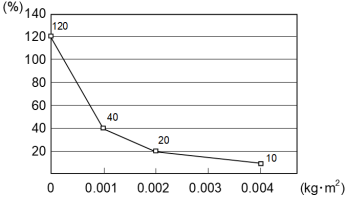
Eccentricity and Inertia Setting
CAUTION
The eccentricity of the load (hand and workpiece) must be 50 mm or less.
The GX1 series Manipulators are not designed to work with eccentricities exceeding 50 mm. Always set the value based on the eccentricity. Setting the eccentricity parameter to a value smaller than the actual eccentricity may cause errors or impact that not only impair full functionality but also shorten the life of the mechanical components.
Eccentricity
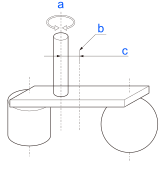
| Symbol | Description |
|---|---|
| a | Rotation axis |
| b | Load center of gravity position |
| c | Eccentricity (50 mm or less) |
Eccentricity of Load Attached to Shaft
The eccentricity of the load (hand + workpiece) attached to the shaft can be set by the "Eccentricity" parameter in the Inertia statement.
Go to [Tools] - [Robot Manager] - [Inertia] panel, and enter the value in [Eccentricity].
(This can also be set using the Inertia statement in [Command Window].)
Automatic Acceleration/Deceleration Correction at Inertia (Eccentricity) Setting

The percentages on the graph are ratios based on 100% as the acceleration/deceleration at the 0 mm setting.
If it exceeds 50 mm, please contact the supplier.
Calculating the Moment of Inertia
An example of calculating the moment of inertia of a load (hand holding a workpiece) is shown below.
The moment of inertia of the entire load is calculated by the sum of individual parts (A), (B), and (C).
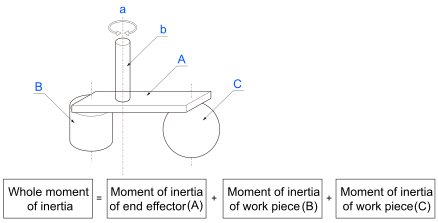
| Symbol | Description |
|---|---|
| a | Rotation axis |
| b | Shaft |
| A | Hand |
| B | Workpiece |
| C | Workpiece |
The methods for calculating the moment of inertia for (A), (B), and (C) are shown below. Use the moment of inertia of these basic shapes as a reference to find the moment of inertia of the entire load.
(A) Moment of inertia of a rectangular parallelepiped
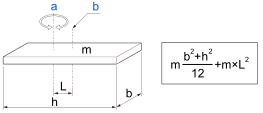
| Symbol | Description |
|---|---|
| a | Rotation axis |
| b | Center of gravity of rectangular cuboid |
(B) Moment of inertia of a cylinder
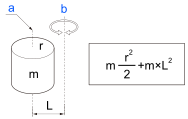
| Symbol | Description |
|---|---|
| a | Center of gravity of cylinder |
| b | Rotation axis |
(C) Moment of inertia of a sphere
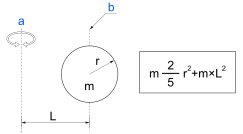
| Symbol | Description |
|---|---|
| a | Rotation axis |
| b | Center of gravity of sphere |