Responses for Emergencies or Malfunctions
When a Collision with the Manipulator Occurs
If the Manipulator has collided with a mechanical stop, peripheral device, or other object, discontinue use and contact the supplier.
Also, if the Manipulator collides with mechanical stops or peripheral devices, the following problems may occur.
- Reduction of the life and damage of the reduction gear unit
- Position gap at the joints
Entanglement with the Manipulator
If an operator gets caught between the Manipulator and a mechanical part such as a base table, press the emergency stop switch to release the operator by using the following method.
- Operator body is entangled with a robot arm
The brake is not functioning. Move the arm manually. - Operator body is entangled with the shaft
The brake is functioning. Press the brake release switch, and move the shaft.
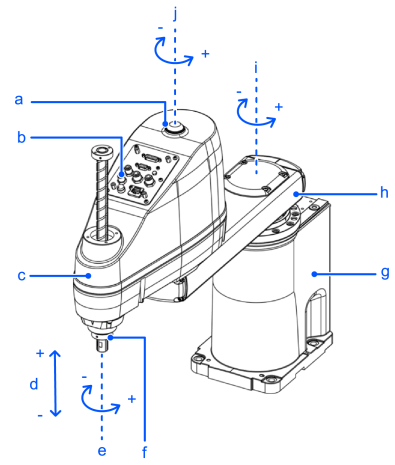
| Symbol | Description |
|---|---|
| a | Indicating lamp |
| b | Joint #3 and Joint #4 brake release switch |
| c | Arm #2 |
| d | Joint #3 (up/down movement) |
| e | Joint #4 (rotation) |
| f | Shaft |
| g | Base |
| h | Arm #1 |
| i | Joint #1 (rotation) |
| j | Joint #2 (rotation) |
CAUTION
- While the brake release switch is being pressed, in addition to Joint #3, Joint #4 may also move due to its own weight. Be careful of the shaft descending and rotating.