Appendix D: Stopping time and Stopping distance when Safeguard is Opened
The stopping time and stopping distance when safeguard is opened are shown in a graph for each model.
The stopping time is “Stopping time” in the figure below. Be sure to confirm that safety is ensured according to the installation environment and operation of the robot.
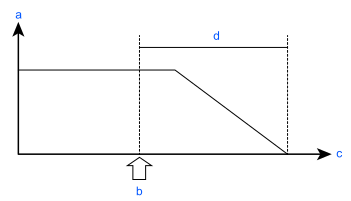
| Symbol | Description |
|---|---|
| a | Motor speed |
| b | Safeguard open |
| c | Time |
| d | Stopping Time |
Conditions
The stopping time and stopping distance vary depending on the parameters (setting value) set for the robot. These graphs show the time and distance for the following parameters.
These conditions are made based on the ISO 10218-1:2011 Annex B.
- Accel : 100, 100
- Speed: 100 %, 66 %, 33 % Setting
- Weight: 100 %, 66 %, 33 % of the maximum payload
- Arm elongation rate: 100 %, 66 %, 33 % *1
- Other: Default
- Motion: Singular axis motion of the Go command
- Input timing of the Stop signal: Input with maximum speed. In this motion, it is the center of the motion range.
*1 The arm elongation rate when J1 is operating: Arm elongation rate 0 is as shown in the figure below.
Among the following arm elongation rate, the stopping time and stopping distance with the longest results are indicated in the graph.
During J2 operation, J3 is 0 mm.
| Axis | θ = 100% | θ = 66% | θ = 33% |
|---|---|---|---|
| J1 | 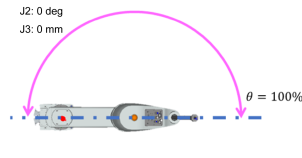 | 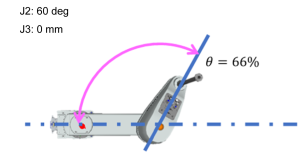 | 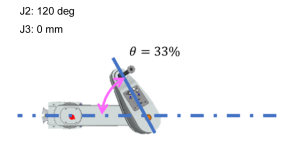 |
Description of legend
The graph is shown for each Weight value.
- Horizontal axis: Arm speed (Speed value)
- Vertical axis: Stopping time and stopping distance in each arm speed
- Time [sec]: Stopping time (sec)
- Distance [deg]: J1 and J2 stopping distance (degree)
- Distance [mm]: Stopping distance of J3
The following apply to malfunction of a singular product.
- Stopping distance and angle: Reach the mechanical stop of each axis
- Stopping Time: Add 500 ms