LED and 7-segment LED
LED and 7-segment LED Display
The Controller has 4 LEDs and a 4-digit, 7-segment LED
- LED
The LED (TEST, TEACH, AUTO, PROGRAM) corresponding to the current operation mode (TEST, TEACH, AUTO, PROGRAM) lights up. - 7-segment LED
This displays line numbers and the Controller status (error number, warning number, emergency stop, and safeguard status).
From immediately after power-on until Controller startup
- LED
All four LEDs blink. - 7-segment LED
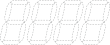
All 4-digit 7 segments are turned off.
After Controller startup
LED
The LEDs (TEST, TEACH, AUTO, PROGRAM) corresponding to the current operation mode (TEST, TEACH, AUTO, PROGRAM) turn on.7-segment LED
The displayed information changes depending on the Controller status.
If several Controller conditions occur at the same time, the displayed information on the top row takes precedence. For example, if an "emergency stop state" and a "safeguard open state" occur at the same time, the following display will appear.
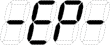
Controller State 7-segment LED Display Preparing to save the Controller state to the USB memory device Repetition of the following display
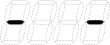
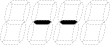
Saving the Controller state to the USB memory device The elapsed time while saving the Controller state is displayed as a percentage Successfully saved Controller state to the USB memory device 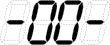 (00) display (2 sec.)
Failed to save Controller state to the USB memory device 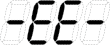 (EE) display (2 sec.)
Emergency stop state Blinking display Safeguard open state 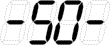 (SO)
(SO)Blinking display Error state Repetition of 4-digit error number (0.5 sec.) and 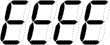 (EEEE) display (0.5 sec.)
*1 Warning state Repetition of 4-digit warning number (0.5 sec.) and  (HELP) display (0.5 sec.)
*1 READY state 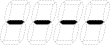
Blinking display START state  (L) Line number
Blinking display *2 PAUSE state  (P) Line number
Blinking display *2
*1 For error numbers, please refer to the following manual or online help.
"Status Code/Error Code List"
*2 In the initial state, the execution line of task number 1 is displayed in 3 digits.
The task number that is displayed can be changed with a Ton statement.
For details, refer to the following manual or online help.
"Epson RC+ SPEL+ Language Reference"
Displays of Special States
When the 7-segment display shows the following details, it indicates a special state.
| 7-segment LED Display | State | Remedy |
|---|---|---|
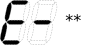 | Controller startup process failed | When Initialize Error occurs, restart the Controller. If the Initialize Error is still displayed even after restarting the Controller, please contact the supplier. |
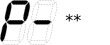 | Controller startup process failed | When Initialize Error occurs, restart the Controller. If the Initialize Error is still displayed even after restarting the Controller, please contact the supplier. |
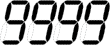 | Display: 9999 Controller is in recovery mode | Refer to the following section and carry out recovery work. Appendix C: Troubleshooting -Controller Recovery |
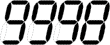 | Display: 9998 Low AC power detected and Controller software terminated | Confirm the AC power supply voltage. If this occurs after maintenance, confirm that each harness is properly connected to the board. |
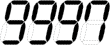 | Display: 9997 Epson RC+ (software) or the Teach Pendant (optional) issued a command to exit the software. | This is the normal display when the system is shut down. No action is required. |
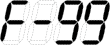
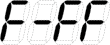 | Hardware information is updating | If hardware information is updated while updating the firmware, it will be displayed. The data is updating. Do not turn off the power until the indicator disappears. |
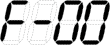
| System storage initialization The numeric value represents the initialization status. 00 % to 99 % | The data is updating. Do not turn off the power until the indicator disappears. |
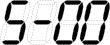
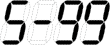
| System error S-00 % to S-99 % | Restart the Controller. If it is still displayed even after restarting the Controller, please contact the supplier. |