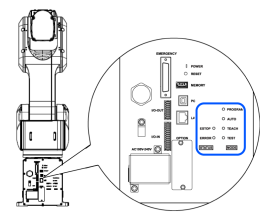
Power On Procedure
- Check the EMERGENCY connector connection.
- Connect the TP bypass plug to the TP port.
- Connect the power cable to the Manipulator.
- Connect the power cable to the power supply socket.
- The AUTO LED blinks approximately 30 seconds after the Controller starts up normally.
If the ERROR LED is turned ON or blinking, check connection in step (1) to (4) and turn ON the power again.
If the ERROR LED is still ON or blinking, contact the supplier.
CAUTION
Turning off the Manipulator before the AUTO LED starts blinking may cause the Controller to malfunction.