Part Names and Motion Range of Each Arm
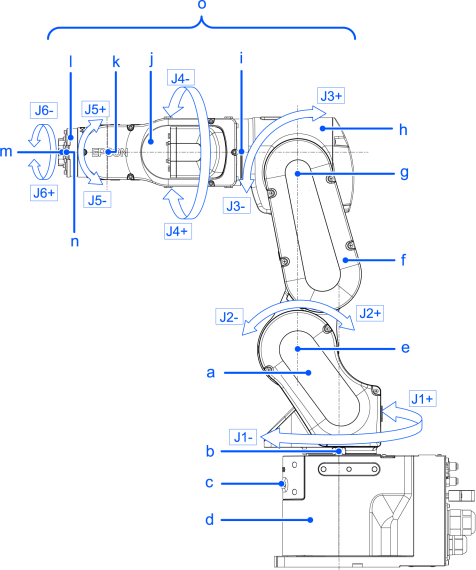
| Symbol | Description |
|---|---|
| a | Arm #1 (Lower Arm) |
| b | Joint #1 (The whole Manipulator revolves.) |
| c | LED Lamp (This lamp lights up while the motors are on.) |
| d | Base |
| e | Joint #2 (The lower arm swings.) |
| f | Arm #2 |
| g | Joint #3 (The upper arm swings.) |
| h | Arm #3 |
| i | Joint #4 (The wrist revolves.) |
| j | Arm #4 |
| k | Joint #5 (The wrist swings.) |
| l | Arm #5 |
| m | Arm #6 |
| n | Joint #6 (The hand rotates.) |
| o | Upper Arm (Arms #3 to #6) |
KEY POINTS
When the LED lamp is lighting or the Controller power is on, the current is being applied to the Manipulator. (The LED lamp may not be seen depending on the Manipulator’s posture. Be thoroughly careful. Performing any work procedure with the power turned on is extremely dangerous and may result in electric shock and/or malfunction of the robot system. Before starting any maintenance work, be sure to turn off the Controller.
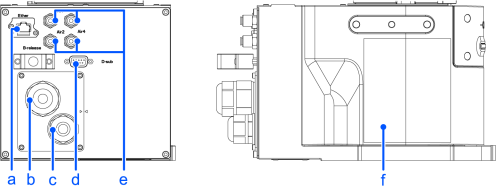
| Symbol | Description |
|---|---|
| a | User cable connector (Ethernet connector) |
| b | Power cable |
| c | Signal cable |
| d | User cable connector (9-pin D-sub connector) |
| e | Fitting for ⌀4 mm tube |
| f | Face plate (serial number of Manipulator) |