Overview
RC+ Extensions is also explained in a video.
| Title | Link |
|---|---|
| 1. New Feature: RC+ Extensions |  (opens new window) (opens new window) |
KEY POINTS
- An internet connection is required to view the videos.
- The video include an audio track.
- To view in your native language, use YouTube's auto-translated subtitles feature.
RC+ Extensions is a platform that enables flexible expansion by allowing users to customize Epson RC+ 8.0 according to their applications and business processes, and to integrate with external devices and systems.
In addition to the extensions provided by Epson, users can develop their own extensions using Visual Studio and install them in Epson RC+ 8.0 for use.
This enables Epson RC+ 8.0 to be continuously and flexibly evolved, and makes it easy to reuse and share the developed extensions within an organization.
Functions of RC+ Extensions:
- Using extensions: You can install and use extensions provided by Epson or extensions developed by users.
- Developing extensions: You can create your own extensions using Visual Studio and the RC+ Extensions SDK.
KEY POINTS
Epson RC+ 8.0 Ver. 8.1.3.0 or later, as well as an Epson RC+ Premium Edition license, is required.
Definition of terms
| Term | Description |
|---|---|
| RC+ Extensions | It is a platform for extending Epson RC+ 8.0. In addition to the extensions provided by Epson, users can develop their own extensions and add them to Epson RC+. By using RC+ Extensions, flexible customization according to specific applications becomes possible, such as extending the Epson RC+ user interface, integrating with external devices, and incorporating custom processing. |
| Extension | It refers to an extension that is developed using RC+ Extensions and can be added to Epson RC+. Extensions are developed using Visual Studio and the RC+ Extensions SDK, and are output as packages in the .rcxpkg format for distribution. By installing an extension in RC+, functions such as UI and menu additions, SPEL+ integration, and external device control can be implemented. |
| Extensions Manager | It is an Extension management screen provided in Epson RC+. The following operations can be performed for extensions: *See Also *Download/Delete *Install/Uninstall *Enable/Disable *Configure local source folder It can be launched from the Epson RC+ main menu by selecting [Extensions] → [Extensions Manager]. |
| Gallery | It is an online distribution server for Extensions officially provided by Epson. A list is automatically displayed on the [Browse] tab of the Extensions Manager, allowing users to select and download the required extensions. An Internet connection is required. Extensions developed by users cannot be published to the Gallery (user distribution is performed using local sources). |
| Local source | It refers to a folder on a PC or a network shared folder used to store Extension packages (.rcxpkg) managed by a user or an organization. When a folder is registered from "Local Source Configuration" in the Extensions Manager, the extensions in that folder are listed on the [Browse] tab, allowing them to be downloaded and installed in the same way as from the Gallery. |
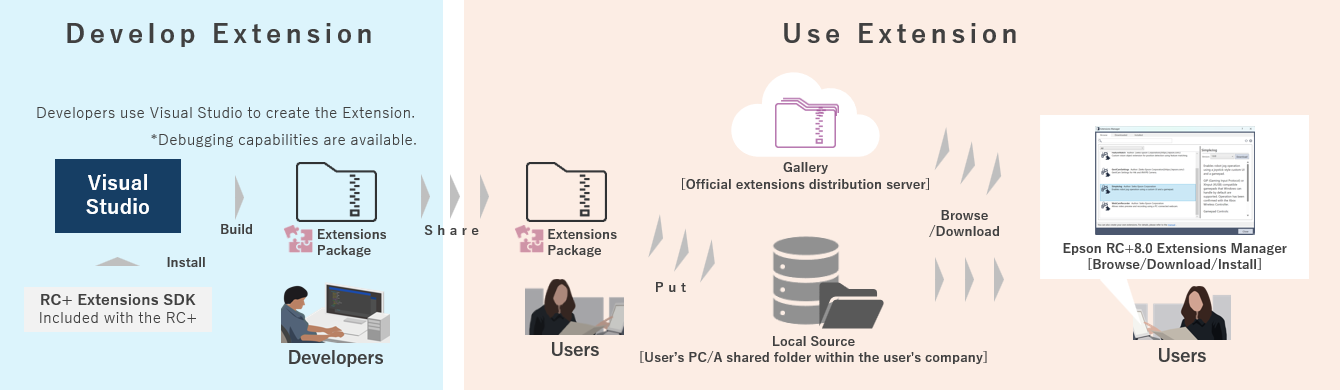
The following figure shows how to use RC+ Extensions and the development procedure.
- User: By using the Epson RC+ Extensions Manager, users can browse, download, and install extensions from the Gallery provided by Epson. By specifying a local source, extensions developed by developers can also be used in the same way.
- Developer: Using Visual Studio and the RC+ Extensions SDK, developers can create, package, and share extensions.
With RC+ Extensions, the following types of extensions can be used and developed. Each type differs in its target functions and development methods.
- RC+ Custom: Customize the UI and processing of Epson RC+
- You can add custom operation screens to Epson RC+. In addition, new functions can be implemented by integrating the standard functions provided by the SDK with external software and hardware.
- PC Vision Custom Vision Object: Customize vision objects
- You can add custom vision objects to the PC Vision functions of VisionGuide. This makes it possible to incorporate custom image processing and detection logic.
There are several ways to use Epson RC+. Depending on your purpose, you can use the following functions accordingly.
| Function | Primary uses |
|---|---|
| RC+ Extensions | It is used to add screens and functions to Epson RC+ and to customize the UI and workflows. In addition, developed extensions can be packaged for reuse and sharing within an organization. |
| RC+ Library Builder | It is used to convert SPEL+ programs into libraries for reuse. |
| RC+ API | It is used to control robots from external applications via Epson RC+ (controlling RC+ from external systems). |