Initial Setup of the Epson Feeder Configurator
This explains the activation and configuration required when you first launch the Epson Feeder Configurator after installation.
Execute activation
When you launch the Epson Feeder Configurator for the first time, an activation screen will appear. Follow the on-screen instructions to activate the device before use.
KEY POINTS
This application cannot be used until activation is complete.
Setting up usage survey
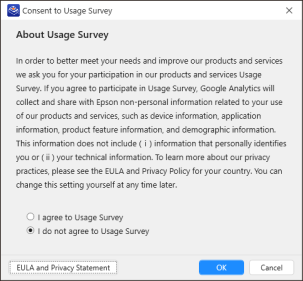
We ask for your cooperation in our usage survey to improve our products and services and better meet your needs. Review the instructions on the screen below, and if you agree, select [I agree to Usage Survey].
KEY POINTS
Your cooperation in our usage survey will help us improve our products and services. You can still use this application even if you do not participate.