Installing the Epson Feeder Configurator
KEY POINTS
The Epson Feeder Configurator installer can be downloaded from Epson's website. For more information, please contact the supplier.
Run the installer Setup.exe you obtained.
An error will occur if Epson Feeder Configurator is already installed and running.
Close the Epson Feeder Configurator and then reinstall it. In this case, reinstalling will reset all previously configured parameters and settings.
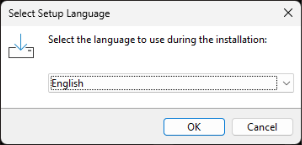
Choose which language to use for the installer.
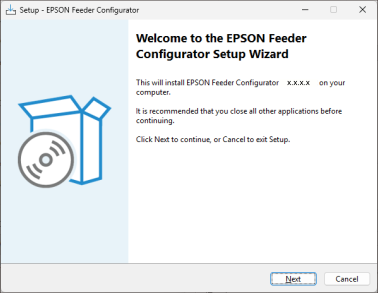
The Setup Wizard runs. Click [Next].
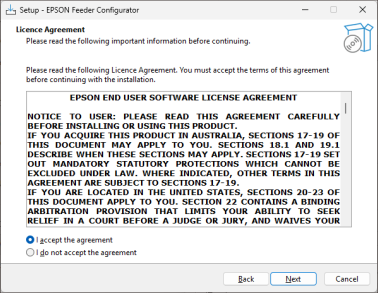
The license agreement appears.
Carefully read the contents. Select [I accept the agreement] only if you agree, and then click [Next].
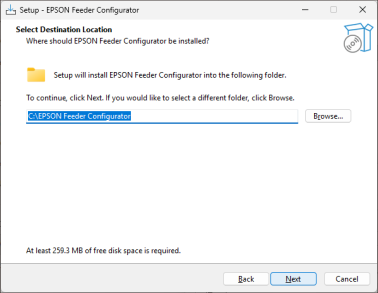
Specify where to install the Epson Feeder Configurator. If necessary, click the [Browse] button to change the installation location.
KEY POINTS
If you specify the same folder as the installation destination on a PC where Epson Feeder Configurator was previously installed, a dialog box notifies you that the installation folder already exists. Select [Yes] to overwrite the contents of the specified installation folder.
Select the tasks to execute and click the [Next] button.
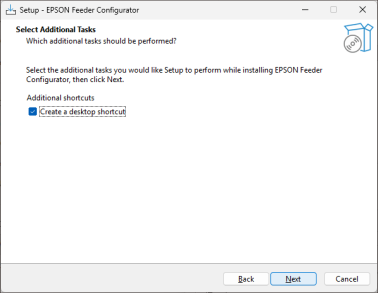
Installation starts and the required files are copied.
The following screen appears when the installation is complete.
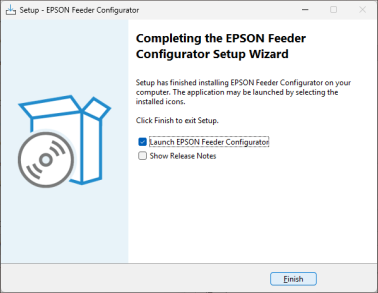
Select the actions you want to perform after the setup is complete, and click the [Finish] button.
KEY POINTS
The language setting selected for the installer is carried over to the language setting of the Epson Feeder Configurator. Select the link below for information about changing the language setting of the Epson Feeder Configurator.
Changing the Language