☰ (Function Selection) Menu
Select the functions you want to use from the seven main functions of Epson Feeder Configurator. After selecting a menu item, the following selection screen will appear.
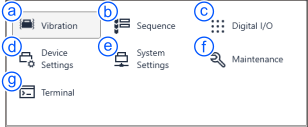
| Item | Description | |
|---|---|---|
| a | Vibration | Adjust and check the vibration parameters for each action. The vibration function has two modes: [Adjust Mode] for adjusting vibration parameters and [Confirm Mode] for reviewing the adjustments made. Important actions can be easily configured using the wizard. |
| b | Sequence | You can create and verify the sequence of movement actions, output actions, and the opening and closing of purge gates. The sequencing function has two modes: [Create Mode] for creating sequences and [Adjust Mode] for reviewing the sequences you have created. |
| c | Digital I/O | You can check and debug digital I/O interfaces. You can monitor the status of inputs and outputs. |
| d | Device Settings | You can configure the devices connected to the feeder unit (hopper, purge gate) and the backlight settings. |
| e | System Settings | You can configure and check the system settings. |
| f | Maintenance | You can perform maintenance on the feeder unit. |
| g | Terminal | You can display the terminal screen and send and receive dedicated commands with the IF-A series. |