… (Option) Menu
You can perform file operations, system operations, and settings using Epson Feeder Configurator. Pressing the button will display the following screen.
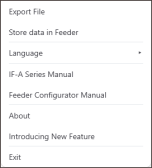
| Item | Description |
|---|---|
| Export File | Outputs the vibration parameters, sequences, and various setting information as a file. |
| Store data in Feeder | The parameters set for the currently selected part ID will be stored to the feeder. |
| Language | Selects the language displayed by this application. Selecting a language will switch the displayed language. |
| IF-A Series Manual | Opens the IF-A Series Manual (PDF file). |
| Feeder Configurator Manual | Opens this manual. |
| About... | Displays the splash screen and Epson Feeder Configurator version information. |
| Exit | Exits the application. |