[System Configuration] menu
Epson RC+ 8.0 Menu- [System Configuration] allows you to change the development environment setting.
Force Sensor
Select [System Configuration]-[Controller]- [Force Sensor]-[Sensor*] to open the settings.
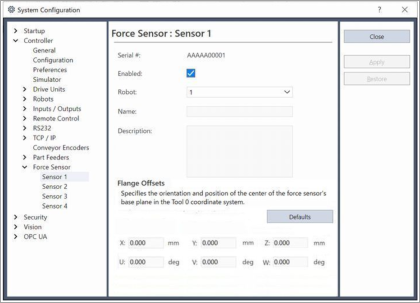
Item | Description |
|---|---|
| Enabled | Set the sensor to use. |
| Robot | Set the robot to use. |
| Close | Close the [System Configuration] dialog. |
| Apply | Apply the input value. |
| Restore | Restore the value before applying. |
| Import | Import the settings from the backup data. For details refer to the following manual. "Epson RC+ User's Guide - Importing the Parameter from the Backup Data" |
| Flange Offsets | Set the robot object, and FlangeOffset property. |
| Defaults | Set the default value to the flange offset. |