TreeNodeEditor Property
Applies To
TreeView
Description
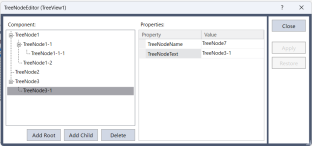
Opens the TreeNodeEditor to setup the tree view control.
Usage
You can use the TreeNodeEditor property only when designing. You can add or delete nodes, set the node name and the displayed text.
| Setting | Description |
|---|---|
| Add to root | Add a new node to the top of the level. |
| Add child element | Add a new child node below the currently selected node. |
| Delete | Delete both the currently selected node and its child node. |
| TreeNodeName | Sets the name of the selected node. |
| TreeNodeText | Sets the displayed text for the selected node. |
Selecting, dragig, and ropping the node allows you to rearrange the node
Values
An integer representing the top coordinate in pixels.
See Also
Tree View Control