Overview
Library Builder is also explained in a video.
| Title | Link |
|---|---|
| 1. New Function: What is Library Builder? |  (opens new window) (opens new window) |
| 2-1. Basic Operation of Library Builder Creator Edition |  (opens new window) (opens new window) |
| 2-2. Basic Operation of Library Builder User Edition |  (opens new window) (opens new window) |
| 3. Let's try it! Library Builder |  (opens new window) (opens new window) |
KEY POINTS
- An internet connection is required to view the videos.
- The video include an audio track.
- To view in your native language, use YouTube's auto-translated subtitles feature.
Library Builder is the generic name for the following functions.
- Function to package configuration data and files from a SPEL+ project as libraries
- Function to add and use created libraries in other SPEL+ projects
Of the SPEL+ project components that are organized into libraries, the following components can be used from the SPEL+ project with library added.
- Global variables
- Backup variables (Global Preserve)
- SPEL+ function
- Form created with GUI Builder
- User error
- Program files
- Include files
- Vision sequence
Library Builder can be used to create your own libraries to assist in the configuration of your production equipment or third-party devices and provide them to your users.
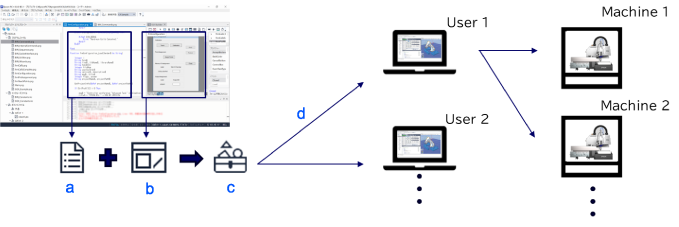
| Symbol | Description |
|---|---|
| a | • Program • Function • Variable |
| b | • Setting screen • Display screen |
| c | Library |
| d | Supply |
KEY POINTS
RC+ 8.0 Ver. 8.1.0.0 or later is required to create and use libraries. Additionally, an RC+ Premium Edition license is required to create a library.
The SPEL+ commands, which are useful for creating libraries, are available in the following controller firmware versions and later.
- RC800 Series: 8.1.0.0
- RC90, RC700 Series: 7.5.5.0
- T, VT Series: 7.5.55.0
For details about the SPEL+ commands, refer to the following.
- SPEL+ Command Reference
- "SPEL+ Language Reference - Appendix C: Epson RC+ 8.0 Commands - C-2: List of commands added by each version of Epson RC+ 8.0"