Restoring the Default IP Address
The following procedure explains how to reboot the IF-240 so that it uses the default IP address, subnet mask and TCP port number. Perform this operation when the IP address, subnet mask, and TCP port are unknown and you cannot connect to the IF-240.
Items needed:
- Torx key, size 10
Unscrew the three screws and remove the cover. Use a Torx key, size 10.

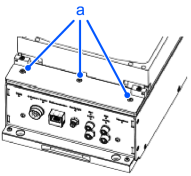
| Symbols | Meaning |
|---|---|
| a | screw |
Set DIP switch 1 as shown in Figure 1.
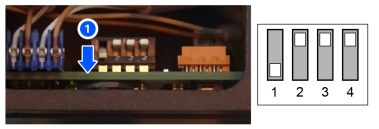
Disconnect and reconnect the power cable. (or switch off and switch on the power of the IF-240)
The IF-240 will use the following default parameters at startup:
- IP Address: 192.168.0.64
- SubnetMask: 255.255.255.0
- TCP Port: 4001
You can use Epson RC+ to modify these parameters as you wish.
For more details, refer to following:
"Epson RC+ 8.9 Option Part Feeding 8.0 Introduction & Software - System Configuration"
When the parameters are defined to your liking, set DIP switch 1 as shown in Figure 2.
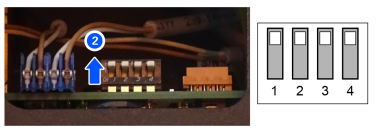
Disconnect and reconnect the power cable. (or switch off and switch on the power of the IF-240)
The IF-240 will start up using the new parameters.
Fasten the screws in the three places shown in the figure below. Use a torx key, size 10.
The tightening torque is 0.9 Nm.
| Symbols | Meaning |
|---|---|
| a | screw |