Replacing the Purging Actuator
CAUTION
Before replacing the actuator, unplug the purging actuator kit from the feeder. Also, remove the platform and the purging actuator kit.
Remove the protective cover.
4 screws Tx10

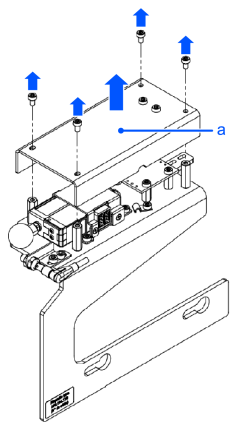
| Symbols | Meaning |
|---|---|
| a | Protective cover |
Disconnect the actuator by pulling on the connector, and not on the cable itself.
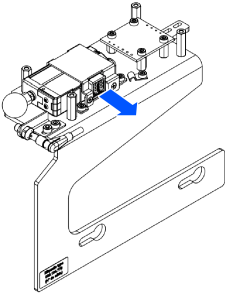
Unscrew the actuator block.
4 screws Tx10
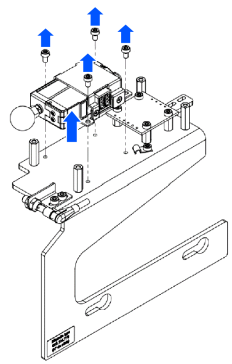
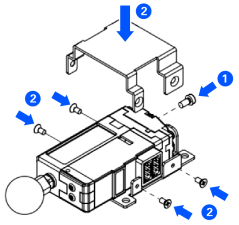
Unscrew and open the support (1).
4 screws X0

Unscrew the actuator (2).
1 screws Tx8
Swap out the actuator.
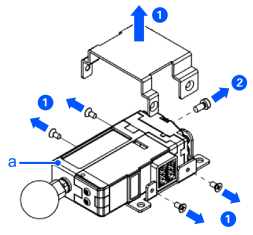
| Symbols | Meaning |
|---|---|
| a | Actuator |
Screw back the actuator in the support (1).
1 screw, Tx8, - 0.8Nm
Close and screw support (2).
4 screws, X0, - 0.6Nm
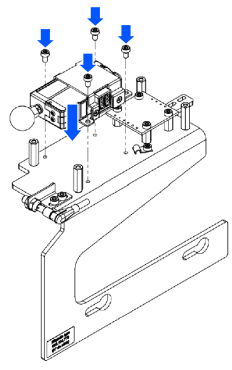
Screw back the actuator block on the main plate.
4 screws, Tx10 - 1Nm
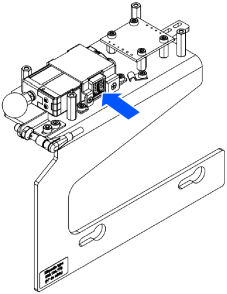
Plug in the actuator.
Screw the protective cover back into position.
4 screws, Tx10, - 0.6Nm
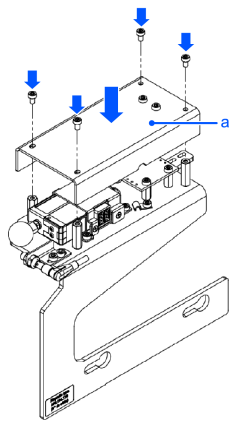
| Symbols | Meaning |
|---|---|
| a | Protective cover |