Replacing the Backlight
WARNING
Be sure that all power sources and other cable connectors to the unit are disconnected before changing the backlight.
Items needed:
- New backlight assembly ordered from the supplier of your region. (Ask for the part code from the supplier.)
- Flat wrench, size 5.5
- Torx key, size 10
Using a size 10 Torx key wrench, remove the 11 screws on each side and remove the two side covers.

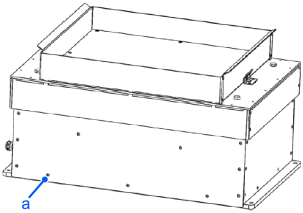
| Symbols | Meaning |
|---|---|
| a | screw |
On both sides, unscrew the four bolts. Use a flat wrench, size 5.5.

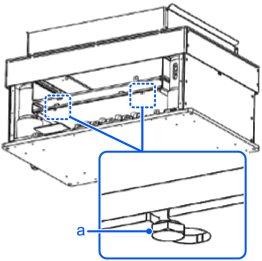
| Symbols | Meaning |
|---|---|
| a | Bolts |
Carefully disconnect the connectors from the electronics.
Remove the old backlight.
The example in the figure is IF-530.
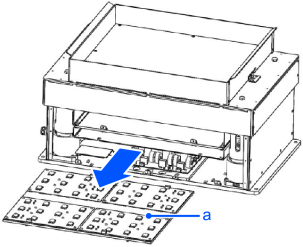
| Symbols | Meaning |
|---|---|
| a | Old backlight |
Insert the new backlight so that it lies flat.
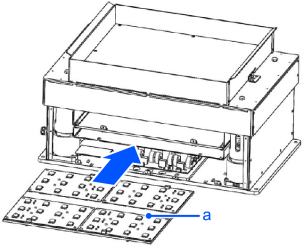
| Symbols | Meaning |
|---|---|
| a | New Backlight |
Secure with four bolts.
Use a spanner, size 5.5
| Symbols | Meaning |
|---|---|
| a | Bolts |
Connect the connectors to the electronics
Attach the covers to both sides and tighten the 11 screws (1.2 N·m) on each side.
Use a Torx key, size 10
| Symbols | Meaning |
|---|---|
| a | Cover |