Replacing the Backlight
WARNING
Be sure that all power sources and other cable connectors to the unit are disconnected before changing the backlight.
Replacing the Backlight
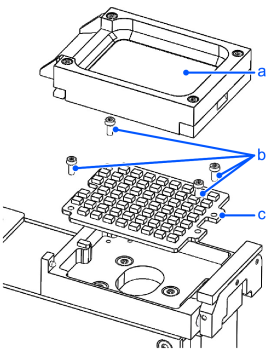
| Symbols | Meaning |
|---|---|
| a | Platform module |
| b | Screws |
| c | Backlight |
Remove the platform module.
For more information on removing the platform, refer to the following.
Remove the four screws.
Remove the backlight.
Place the new backlight.
Screw the four screws (0.2 N·m).
Remount the platform module.