Mounting the Purge Gate
WARNING
Before installing the purge gate, make sure that all power cables and other cables are disconnected from the unit.
CAUTION
Wiring should be performed by a certified technician or qualified person. Wiring work by inexperienced persons may result in injury or breakdown. Also, be sure to install wiring in a way that will not cause people to trip or fall over it.
1. Mounting the plate in the plate frame
Fix the plate (b) to the plate frame (a) using the included screws.
Tighten each screw to the specified tightening torque.
IF-A1520
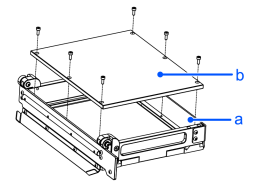
Mounting screw x 7
Tightening torque: 1.2 N·m
IF-A2330
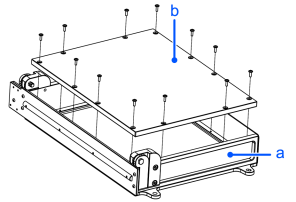
Mounting screw x 12
Tightening torque: 1.2 N·m
KEY POINTS
Apply a drop of adhesive (such as Loctite 243) to the threads of the plate fixing screws before fastening. The adhesive is not supplied with the product.
2. Mounting the actuator unit
KEY POINTS
Make sure to check the orientation of the roller on the tip of the actuator before attaching the actuator unit. If it is attached in the incorrect orientation, follow the procedure below to adjust it to the correct orientation:
- Rotate the roller clockwise until it can no longer be rotated.
- Rotate the roller counterclockwise to adjust it to the correct orientation.
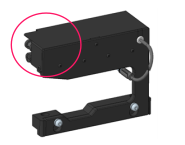
| Correct orientation | Incorrect orientation |
|---|---|
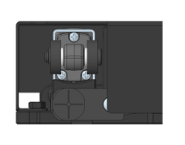 | 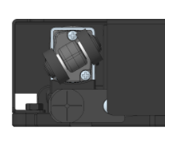 |
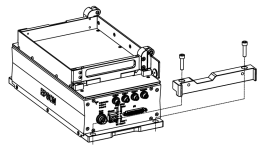
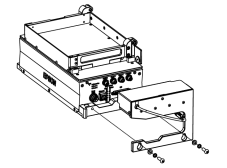
IF-A1520
The actuator unit installation method is the same for the left and right sides.
| Step 1. Mounting the fixing brackets | Step 2. Mounting the actuator unit |
|---|---|
 |  |
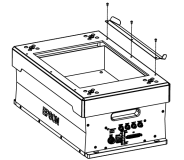
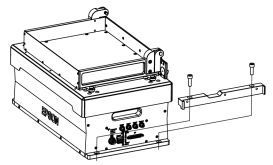
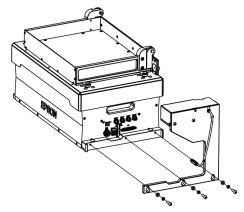
IF-A2330
The actuator unit installation method is the same for the left and right sides.
The mounting position differs for the left and right sides. (Diagram shows the right side)
| Step 1. Guide plate installation | Step 2. Mounting the fixing brackets | Step 3. Mounting the actuator unit |
|---|---|---|
 |  |  |
3. Mounting the platform
Follow the same guidelines as below to install the platform with purge gate.
Attaching/Removing Platform
KEY POINTS
For mounting the IF-A2330, use the screws provided with the plate frame for the purge gate. The standard handle screws cannot be used.
4. Wiring connections
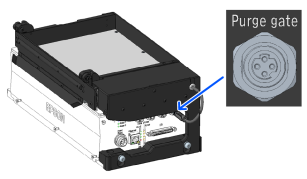
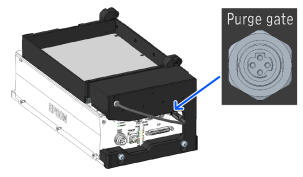
IF-A1520
Connect the control cable that is fixed to the actuator unit to the purge gate interface of the main unit.
| Ejection door at the left | Ejection door at the right |
|---|---|
 |  |
IF-A2330
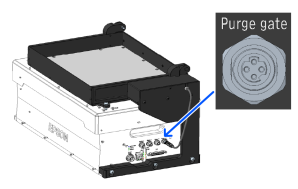
For the right side, directly connect the control cable that is fixed to the actuator unit to the purge gate interface of the main unit. For the left side, connect the supplied extension cable to the control cable and connect it to the purge gate interface of the main unit.
| Ejection door at the left | Ejection door at the right |
|---|---|
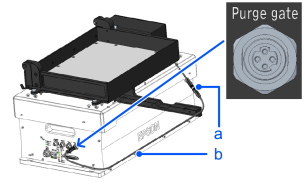 |  |
a: Connector/b: Extension cable