• ja-JP
  • en-US
  • zh-CN
  • zh-TW
  • ko-KR
  • fr-FR
  • de-DE
  • it-IT
  • nl-NL
  • pt-PT
  • es-ES
  • ru
  • Epson RC+ 8.0 Option Part Feeding 8.0 Introduction & Software
    • 010

      • FOREWORD
        • 010-010

    • 020

      • Introduction
        • 020-010

          • Introduction
          • Safety
          • Definition of Terms
          • System Overview
            • 020-010-040

              • Overall Configuration
              • Feeder
              • Robot
              • Vision System
              • Lighting
              • Using a PC
              • Hopper
          • Hardware
          • Feeder and Hopper
          • Operation Overview
          • Parts
          • Let’s Use the Part Feeding Option
            • 020-010-080

              • Workflow
              • Requirements
              • Enable the Part Feeding Options
              • Initializing the Feeder
              • Create a Project for Part Feeding
              • Create a New Part
              • Configure the Lighting Settings
              • Create the Vision Sequences
              • Configure the Vision Settings
              • Configure the Pick Settings
              • Teach Pick Z and Posture
              • Calibration & Test
              • Create the Part Feeding Process Starting Program
              • Create the PF_Robot Callback Function
              • Check Robot Operation
    • 030

      • Software
        • 030-010

    • 040

      • Advanced
        • 040-010

    • 050

      • Troubleshooting
        • 050-010

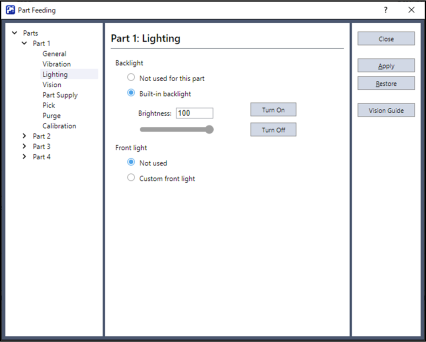
Configure the Lighting Settings

  1. In the tree, click [Lighting].
  2. Click the [On] button to confirm that the feeder’s backlight turns on.

← Create a New Part Create the Vision Sequences →
© 2025 Seiko Epson Corp.