[System History] (View Menu)
Display [System History].
The following information is displayed on this screen.
- Events, errors, and warnings that have been logged in the current controller's system history
- RC+ operation/setting log
KEY POINTS
The RC+ operation/setting log uses part of the information collected for usage survey and is displayed only if you have agreed to the usage survey.
See details below.
The data can be sorted by clicking on any column header. Drop and drop columns to rearrange the order. To sort multiple columns, hold down the shift key and click on multiple columns headers.
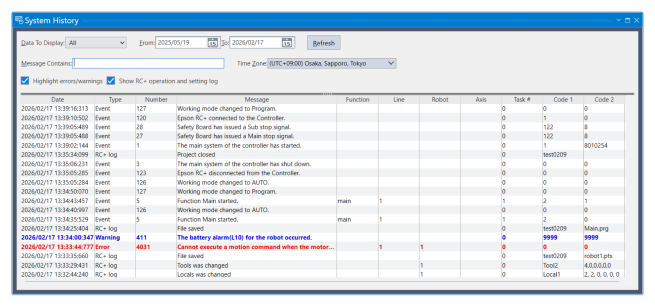
| Item | Description | |
|---|---|---|
| Data To Display | Select which data you would like to view. (Errors, events, warnings, RC+ operation/setting log) | |
| From / To | Select the dates you want to view data from. When the window is first opened, these are automatically set to the first and last dates in the history data. | |
| Message Contains | Enter the error message to search, and then click the [Refresh] button, or press the [Enter] key. | |
| Time Zone | Select a time zone. Time of event, warning, and error occurrences are displayed according to the selected time zone. | |
| Highlight errors/warnings | Error and warning rows are highlighted. | |
| Show RC+ operation and setting log | The RC+ operation/setting log is displayed. This setting is available only with Epson RC+ Standard Edition and Premium Edition. | |
| Refresh | Click this button to reload the data from the controller. | |
| Type | Event | Information for operation and mode change. |
| Warning | Program can be executed continuously, however, needs countermeasure. | |
| Error | Error occurred in the program or the Robot. | |
| Number | For more details on the number, refer to the following manual: "Status Code / Error Code List" manual For the RC+ operation/setting log, this field is left blank. | |
| Message | Displays event, warning, and error messages. | |
| Function and Line number | Function name and the line number are displayed when error occurred while executing a program. | |
| Robot and axis number | Robot and the axis number are displayed when Robot error occurred. | |
| Task number | Task number of the task with error is displayed when error occurred while executing the program. "0" is displayed for others. | |
| Additional information 1 and 2 | More details are displayed for some errors. Refer to the following manual: "Status Code / Error Code List" manual For the RC+ operation/setting log, more detailed information about the operation/setting is displayed. (File name, setting values, etc.) | |