Uninstalling extensions
Extensions are uninstalled from the [Installed] tab of the Extensions Manager.
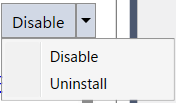
Select the extension you want to uninstall, click the [▼] next to the [Enable]/[Disable] button, and then click the [Uninstall] menu.
The extension is uninstalled upon closing Epson RC+.
*: If you are unable to uninstall the Extension even after following the steps described above, update the Epson RC+ to the latest version, and then try uninstalling the Extension again.