Motion Range Setting by Mechanical Stops
Mechanical stops physically limit the absolute area that the Manipulator can move.
Both Joints #1 and #2 have threaded holes in positions corresponding to angles for the setting area. Set the motion range depending on the position of the mechanical stop (adjustable) Install the bolts in the holes corresponding to the angle that you want to set.
Joints #3 can be set to any length less than the maximum stroke.
The motion area setting cannot be changed by the Joint #3 mechanical stop for the cleanroom environment specification Manipulator.
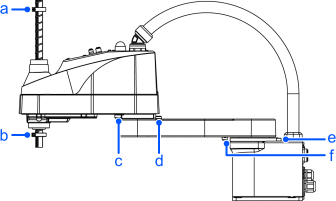
| Symbol | Description |
|---|---|
| a | Mechanical stop of Joint #3 (Lower limit mechanical stop) |
| b | Mechanical stop of Joint #3 (Upper limit mechanical stop): Do not move the position. |
| c | Mechanical stop of Joint #2 (Adjustable) |
| d | Mechanical stop of Joint #1 (Adjustable) |
| e | Mechanical stop of Joint #1 (Fixed) |
| f | Mechanical stop of Joint #2 (Fixed) |