Emergency Movement without Drive Power
When the system is placed in emergency mode, push the arm or joint of the Manipulator by hand as shown below:
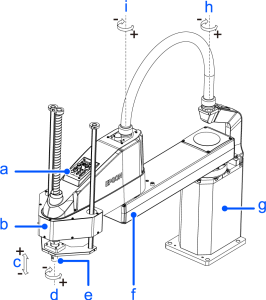
(Figure: LS50-CA04S)
| Symbol | Description |
|---|---|
| a | Joint #3 #4 Brake release switch |
| b | Arm #2 |
| c | Joint #3 (up and down) |
| d | Joint #4 (rotating) |
| e | Shaft |
| f | Arm #1 |
| g | Base |
| h | Joint #1 (rotating) |
| i | Joint #2 (rotating) |
- Arm #1: Push the arm by hand.
- Arm #2: Push the arm by hand.
- Joint #3: The joint cannot be moved up/down by hand until the electromagnetic brake applied to the joint has been released. Move the joint up/down while pressing the brake release switch.
- Joint #4: The shaft cannot be rotated by hand until the electromagnetic brake applied to the shaft has been released. Move the joint up/down while pressing the brake release switch.
CAUTION
The brake release switch is used with both Joint #3 and Joint #4. When the brake release switch is pressed in emergency mode, the brake for both Joints #3 and #4 are released simultaneously. Be careful of getting caught in Joint #3 and 4 operating range due to the shaft falling and rotating while the brake release switch is being pressed because the shaft may be lowered by the weight of the hand.