Greasing
The ball screw spline and reduction gear units need greasing regularly. Only use the grease specified.
CAUTION
- Pay attention to the amount of greasing When greasing runs out, it can cause the slide part to get damaged which may result in not only the ball screw spline and reduction gear units to not function properly but also cost an incredible amount of money and time.
- When applying grease, wear protective equipment (such as goggles, oil-resistant gloves, and a mask) and ensure safety when performing work. If grease gets into your eyes, mouth, or on your skin, follow the instructions below. If grease gets into your eyes, mouth, or on your skin, follow the instructions below.
If grease gets into your eyes
Flush them thoroughly with clean water, and then see a doctor immediately.
If grease gets into your mouth
If swallowed, do not induce vomiting. See a doctor immediately. If grease gets into your mouth, wash your mouth with water thoroughly.
If grease gets on your skin
Wash the area thoroughly with soap and water.
| Greasing part | Greasing Interval | Grease | How to grease | |
|---|---|---|---|---|
| Joint #1, Joint #2 | Reduction gear units | Overhaul timing | - | Greasing shall be performed by personnel who has taken a proper training. For details, refer to the Manipulator’s service manual. |
| Joint #3 | Ball screw spline unit, support shaft | At 100 km of operation (50 km for first greasing) | AFB | Greasing the Ball Screw Spline Unit (mentioned below) |
Joint #3 ball screw spline unit and support shaft
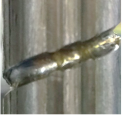
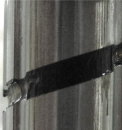
The recommended greasing interval is at 100 km of operation. However, greasing interval can also be checked from the grease condition. Perform greasing if the grease is discolored or becomes dry.
| Normal grease | Dicolored grease |
|---|---|
 |  |
Perform greasing at 50 km of operation for the first time of greasing.
KEY POINTS
In Epson RC+, the recommended greasing interval is referred in Epson RC+ [Maintenance].
Greasing the Ball Screw Spline Unit
| Name | Qty. | Note | |
|---|---|---|---|
| Grease | For Ball Screw Spline Unit (AFB grease) | Proper quantity | - |
| Tools | Wiping cloth | 1 | For wiping grease (Spline shaft) |
| Cross-point screwdriver | 1 | - |
KEY POINTS
Cover the surrounding area such as the end effector and peripheral equipment in case the grease drips.
Turn ON the Controller.
Move the shaft to its lower limit in one of the following methods.
- Move the shaft to its lower limit manually while pressing the brake release switch.
- Move the shaft to its lower limit from Epson RC+ [Tools]-[Robot Manager]-[Jog & Teach].
CAUTION
- Be sure to keep enough space and prevent the end effector hitting any peripheral equipment.
- The brake release switch affects both Joints #3 and #4. When the brake release switch is pressed, the brakes for both Joints #3 and #4 are released simultaneously. Be careful of the shaft falling and rotating while the brake release switch is being pressed because the shaft may be lowered by the weight of the hand.
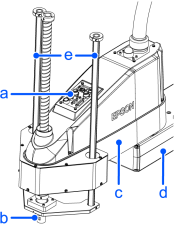
| Symbol | Description |
|---|---|
| a | Joint #3 #4 Brake release switch |
| b | Shaft |
| c | Arm #2 |
| d | Arm #1 |
| e | Support shaft |
Turn off the Controller.
Wipe off the old grease from the shaft, and then apply new grease to it.
The grease application area is from the end of the shaft spline nut to the mechanical stop and the entire side of the support shaft.
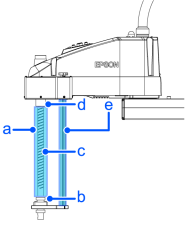
| Symbol | Description |
|---|---|
| a | Grease application range |
| b | Mechanical stop |
| c | Shaft |
| d | End of the spline nut |
| e | Support shaft |
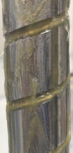
Grease should be applied to the helical and vertical grooves of the shaft so that the grooves are filled evenly.
Grease application example:
Turn on the Controller.
Start the robot manager and move the shaft to the origin position.
Be careful not to hit peripheral equipment.
After moving to the origin position, reciprocate the shaft. The reciprocating operation is a low power mode operation program that performs from the upper limit to the lower limit. Run for about 5 minutes to spread the grease over the shaft.
Turn off the Controller.
Wipe off any excess grease at the end of the spline nut, mechanical stop, and the support shaft.
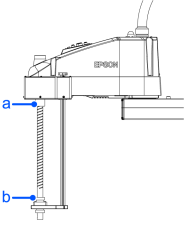
| Symbol | Description |
|---|---|
| a | End of the spline nut |
| b | Mechanical stop |