Confirm that VRT Option is Enabled
When VRT option is installed, you can edit VRT data on Epson RC+.
Follow the steps below and confirm that the option is installed properly.
- Select Epson RC+ menu-[Tools]-[Robot Manager].
- Confirm the [VRT] tab.
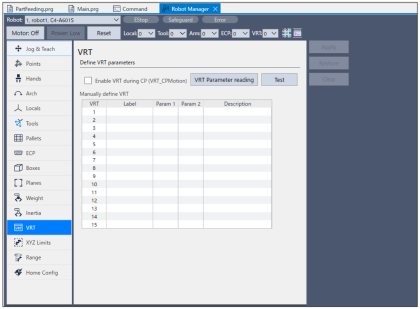
If the [VRT] tab is not displayed, follow the steps below.
Select Epson RC+ menu-[Project]-[Properties]-[Operator Settings]-[Robot Manager].
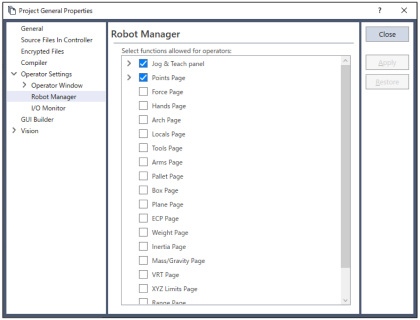
Place a checkmark on [Select pages and options allowed for operators:]- [VRT Page].
Confirm that the [VRT] tab is displayed on Robot Manager.
If the [VRT] tab is still not displayed after performing the above steps, refer to the following sections.
“Epson RC+ 8.0 User's Guide - Installing Controller Options”