System Requirements
To use Vision Guide 8.0 adequately, following environment is required.
| Item | Contents | |
|---|---|---|
| Supported OS |
| |
| PC requirements (Recommended specifications) | CPU | Core i5 or higher (Models released in 2017, 8th generation or later) |
| Memory | 8 GB or more | |
| Graphic | DirectX 12 or later | |
| Ethernet adapter (NIC) | Intel Pro 1000 series*1 | |
KEY POINTS
Vision Guide 8.0 does not support high contrast mode.
*1: The following Ethernet adapters are supported.
| Intel Pro 1000 chipset | Hardware ID |
|---|---|
| 82540EM | PCI\VEN_8086&DEV_100E |
| 82540EP_EL | PCI\VEN_8086&DEV_101E |
| 82541GI/PI | PCI\VEN_8086&DEV_1076 |
| 82541GI/LF | PCI\VEN_8086&DEV_107C |
| 82545EM | PCI\VEN_8086&DEV_100F |
| 82545GM | PCI\VEN_8086&DEV_1026 |
| 82563EB/80003ES2 | PCI\VEN_8086&DEV_1096 |
| 82567 | PCI\VEN_8086&DEV_1501 |
| 82571EB/GB | PCI\VEN_8086&DEV_105E |
| 4-Port (2x82571EB/GB) | PCI\VEN_8086&DEV_10A4 |
| 4-Port LP (2x82571EB/GB) | PCI\VEN_8086&DEV_10BC |
| 82572EI/GI | PCI\VEN_8086&DEV_10B9 |
| 82572EI/GI-Copper | PCI\VEN_8086&DEV_107D |
| 82573E | PCI\VEN_8086&DEV_108B |
| 82573E-IAMT | PCI\VEN_8086&DEV_108C |
| 82573L | PCI\VEN_8086&DEV_109A |
| 82580 (I340) | PCI\VEN_8086&DEV_150E |
| I350 | PCI\VEN_8086&DEV_1521 |
| I210 | PCI\VEN_8086&DEV_1533 |
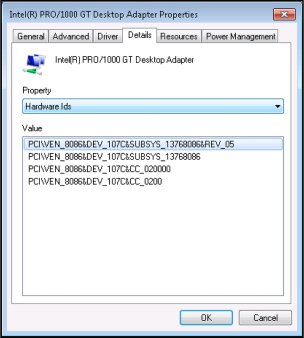
To check the Hardware IDs for your network adapter:
- Click [Start]-[Run].
- Enter “devmgmt.msc”.
- Click the [OK] button to display the [Device Manager].
- Expand the node for [Network Adapters].
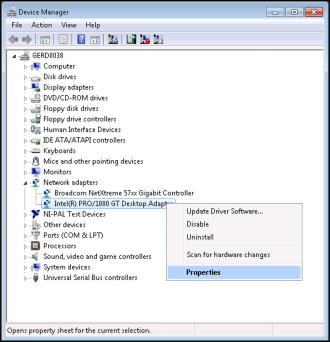
- Right click the Network Adapter to be checked and select [Properties] from the displayed menu.
- Click the [Details] tab and select “Hardware Ids” in [Property] list.