WEIGHT Setting
CAUTION
- Set the total weight of the hand and the workpiece smaller than the maximum payload. The CX7 series Manipulators can operate without limitations on the condition unless and until the load exceeds this maximum payload. Always set the Weight parameters of the WEIGHT command according to the load. Setting a value smaller than the actual weight may cause errors or impact that not only impair full functionality but also shorten the life of the mechanical components.
The acceptable weight capacity (hand + workpiece) for CX7 series Manipulators is as follows:
| Maximum |
|---|
| 7 kg |
Change the setting of the Weight parameter according to the load. After changing the Weight parameter setting, the maximum acceleration/deceleration and speed of the robot system is set automatically.
Setting method of Weight parameters

Select [Tools]-[Robot Manager]-[Weight] panel and set the value in [Weight:]. You may also execute the Weight command from [Command Window].
Load on the Manipulator
Mounting location of the load
CX7-A701*** (CX7)
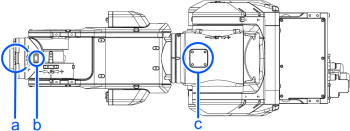
| Symbol | Description |
|---|---|
| a | Load on the fore end of Arm #6 |
| b | Arm #5 deck |
| c | Arm #3 deck |
CX7-A901*** (CX7L)
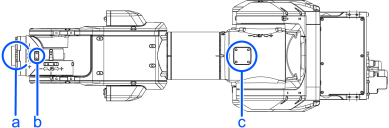
| Symbol | Description |
|---|---|
| a | Load on the fore end of Arm #6 |
| b | Arm #5 deck |
| c | Arm #3 deck |
Deck detailed (Units: mm)
| Arm #5 deck | Arm #3 deck |
|---|---|
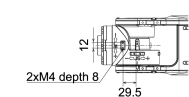 | 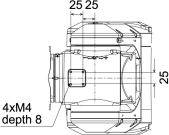 |
When you attach the equipment to the decks on the upper arm, convert its weight into equivalent weight assuming that the equipment is attached to the end of the Arm #6. Then, this equivalent weight added to the load will be a Weight parameter.
Calculate the Weight parameter by using the formula below and enter the value.
Weight Parameter Formula
Weight Parameter=Mw+ Wa + Wb
- Mw: Payload on the fore end of Arm #6 (kg)
- Wa: Equivalent weight of the Arm #3 deck (kg)
- Wb: Equivalent weight of the Arm #5 deck (kg)
- Wa=Ma (La)2/(L)2
- Wb=Mb (Lb)2/(L)2
- Ma: Weight of the air valve on the Arm #3 deck (kg)
- Mb: Weight of the camera on the Arm #5 deck (kg)
- L: Length of the upper arm (CX7-A701: 411.5 mm, CX7-A901: 511.5 mm)
- La: Distance between the Joint #3 and the center of gravity of the air valve on the Arm #3 deck (mm)
- Lb: Distance between the Joint #3 and the center of gravity of the camera on the Arm #5 deck (mm)
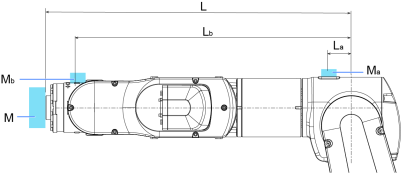
Example:
When the following loads apply to CX7-A901*** which fore end of the Arm #6 is 511.5 mm (L) away from the Joint #3 and payload (Mw) is 5 kg:
- Load on the Arm #3 deck is 1.5 kg (Ma). The deck is 0 mm (La) away from the Joint #3.
- Load on the Arm #5 deck is 1.0 kg (Mb). The deck is 460 mm (Lb) away from the Joint #3.
Wa=1.5 × 02/511.52=0
Wb=1.0 × 4602/511.52=0.81 → 0.9 (round up)
Mw+Wa+Wb=5+0+0.9=5.9
Enter "5.9" for the Weight parameter.
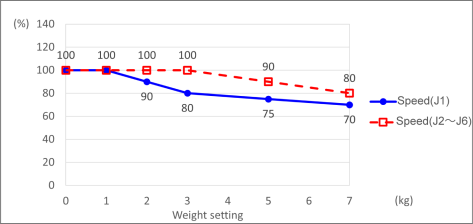
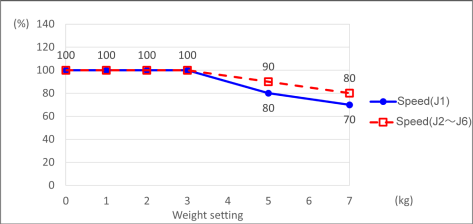
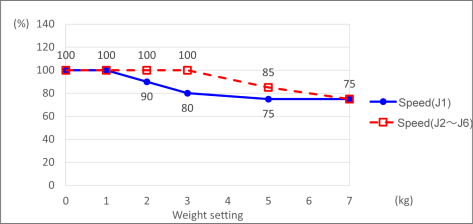
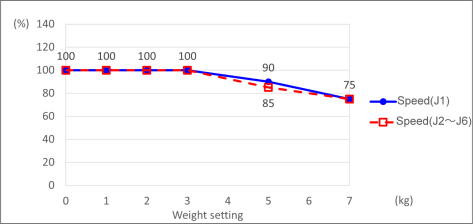
Automatic speed setting by Weight parameter
The percentages on the graph are ratios based on 100% as the [Maximum operating speed] of CX7 specifications.
CX7-A701***
Standard mode
Boost mode
CX7-A901***
Standard mode
Boost mode
KEY POINTS
Maximum AccelS setting value varies depending on Weight setting value. For details, refer to the following section.
CX7 Specifications
Automatic speed setting by Weight parameter
For details on the automatic acceleration/deceleration setting of J6, refer to the following:
INERTIA Setting
CX7-A701***
Standard mode
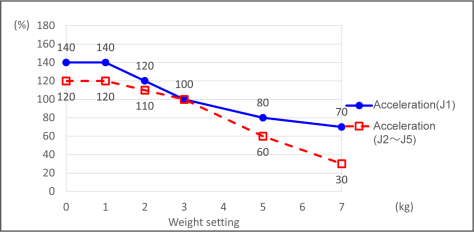
Boost mode *1
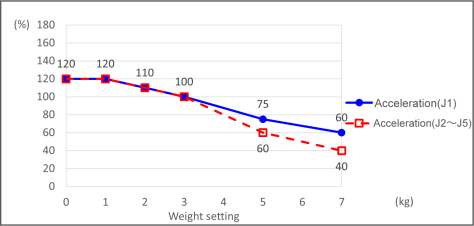
CX7-A901***
Standard mode
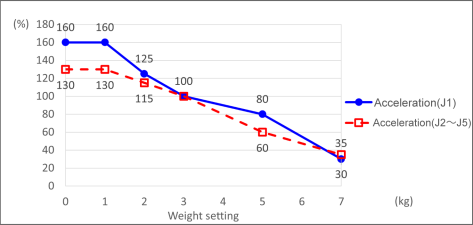
Boost mode *1
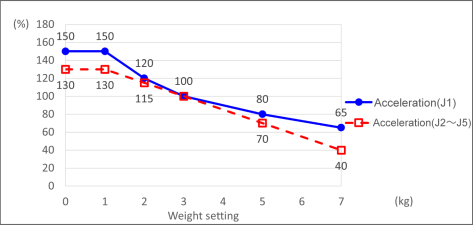
*1: The rated acceleration and deceleration speed (100%) of the boost mode is faster than the standard mode.