• ja-JP
  • en-US
  • zh-CN
  • zh-TW
  • ko-KR
  • fr-FR
  • de-DE
  • it-IT
  • nl-NL
  • pt-PT
  • es-ES
  • ru
  • Epson Feeder Configurator Manual
    • 010

      • FOREWORD
        • 010-001

    • 020

      • Safety
        • 020-001

    • 030

      • Overview of Epson Feeder Configurator
        • 030-001

          • Software Overview
          • System Configuration Example of IF-A series
            • 030-020

              • System Configuration when Combined with an Epson Robot Controller
              • System Configuration when Controlling with External Devices Such as PLCs
          • Basic Concepts of Epson Feeder Configurator
            • 030-030

              • Parts
              • Movement Action
              • Output Movement
              • Sequence
              • File I/O
    • 040

      • Preparing to Use the Epson Feeder Configurator
        • 040-001

    • 050

      • Instructions for starting Epson Feeder Configurator
        • 050-001

    • 060

      • Basic operation of the Epson Feeder Configurator
        • 060-001

    • 070

      • Epson Feeder Configurator Menu
        • 070-001

    • 080

      • Advanced Operations of Epson Feeder Configurator
        • 080-001

    • 090

      • Commands Available in the Terminal
        • 090-001

    • 100

      • Troubleshooting
        • 100-001

System Configuration when Combined with an Epson Robot Controller

When using a combination of an Epson robot and feeder, each device can be controlled using Epson RC+. The parameters are set via the controller from Epson RC+.
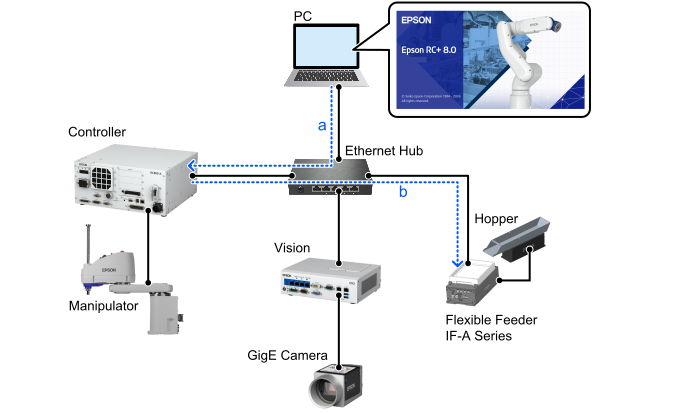
  • a: Control programs created with Epson RC+ are stored in the controller.
  • b: The feeder is controlled by the controller.

← System Configuration Example of IF-A series System Configuration when Controlling with External Devices Such as PLCs →

© Seiko Epson Corporation 2026