如何在Windows中禁用快速启动功能
如何禁用快速启动
请按照以下步骤操作,禁用快速启动。
* 执行此操作后,除非再次启用快速启动功能,否能该功能将保持禁用状态。
点击开始菜单,显示应用程序列表。
找到“W”栏,点击[Windows System],然后选择[Control Panel]。
显示[Control Panel]对话框。
确认[View by] 设置为“Category”,然后单击[System and Security]。
*如果[View by]设置为Icon,请单击[Power Options]选项并继续执行步骤4。
显示[System and Security]对话框。
单击“Power Options”。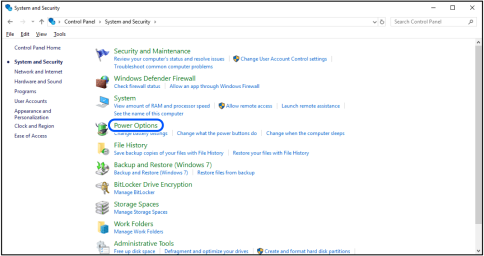
显示[Power Options]。
选择“Choose what the power buttons do”。
显示[System Settings]。
选择“Change settings that are currently unavailable”。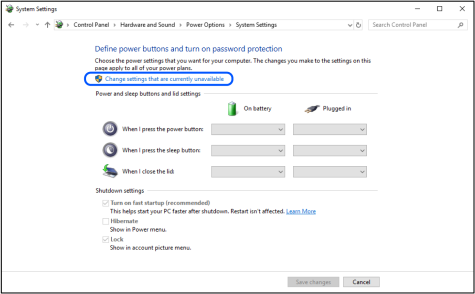
取消勾选[Shutdown settings]字段中的“Turn on fast startup”选项,然后单击[Save changes]。
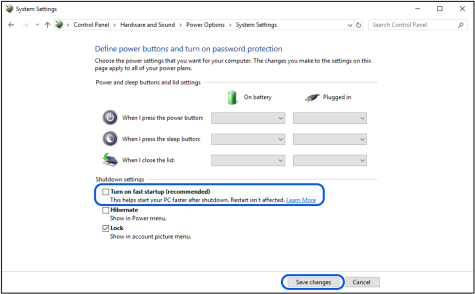
综上,完成设置。
下次启动电脑时,则将禁用快速启动功能。