編輯輸入/輸出大小
您可視需要變更CC-Link從屬模組的輸入/輸出大小。
選擇[Setup]-[System Configuration]並顯示[System Configuration]對話方塊。
選擇[Controller]-[Inputs / Outputs]-[Fieldbus Slave]-[General]。
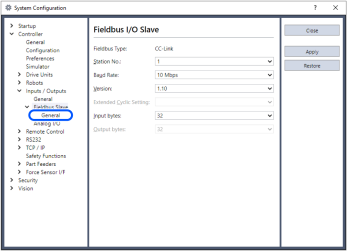
變更CC-Link的[Version]。
將[Version]變更為“2.00”。
變更[Extended Cyclic Setting] 的設定。
在此範例中,將[Extended Cyclic Setting]變更為“2”。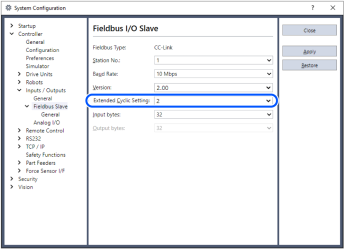
變更[Input Byte]和[Output Byte]的設定。
在此範例中,將Input變更為「92」位元組。則Output也同樣變為「92」位元組。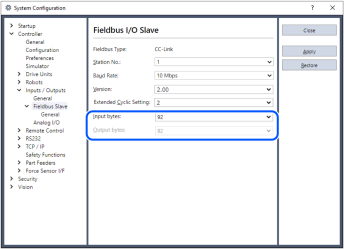
按一下[Apply]。
按一下[Close]。
將顯示以下對話方塊,並自動重新啟動控制器。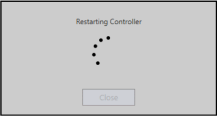
選擇[Setup]-[System Configuration]並顯示[System Configuration]對話方塊。
選擇[Controller]-[Inputs / Outputs]。

確認「Fieldbus slave」中顯示以下項目。
Inputs:512 - 1247
Outputs:512 - 1247在此範例中,輸入位元組為92位元組(736位元),而512-1247則會顯示在輸入中。
此外,輸出位元組為92位元組(736位元),而512-1247則會顯示在輸出中。
按一下[Close]。