Wiring of the Force Sensor Cable
The following are recommended wiring examples of the Force Sensor and rough operation ranges of the Manipulator. For actual applications, fix the wiring according to your Manipulator use.
CX4,CX7 series-S250A-ISO2-S, S250A-ISO2-P
CX4, CX7 series Manipulator wiring example
Wiring example 1: Internal wiring
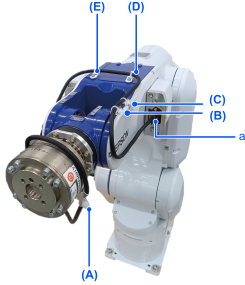
| Symbol | Description |
|---|---|
| A-E | Binding part |
| a | User connector (RJ45 connector) |
Length of A-B (excess length for rotation of J5 and J6): 753mm
Wiring example 2: External wiring (only for S250A-ISO2-S)
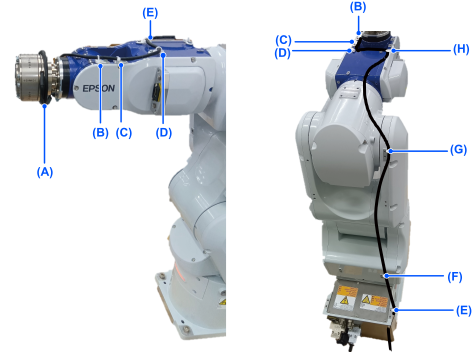
| Symbol | Description |
|---|---|
| A-H | Binding part |
| a | Sensor Binding Part |
Length of A-B (excess length for rotation of J5 and J6): 753mm
Adjust the lengths of C-D and E-F according to the operation of the manipulator.
CX4, CX7 series Manipulator rough operation range
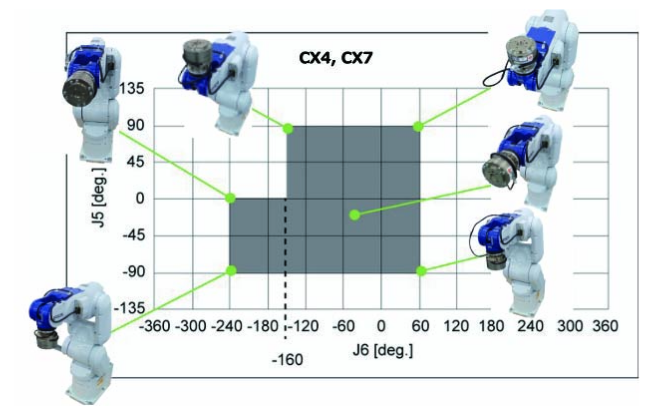
J5 | J6 |
|---|---|
| 0 ~ 90 deg | -160 ~ 60 deg |
| -90 ~ 0 deg | -240 ~ 60 deg |
CAUTION
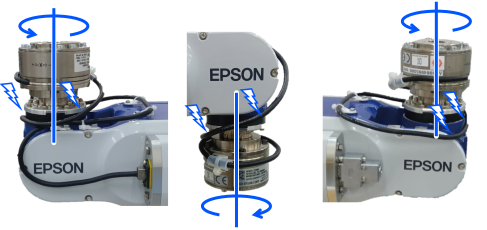
- The cables may deform during storage. Caution is required this regard. The cable's bend radius is at least five times larger than the cable diameter (R=30 mm or larger).
- The cable may rub against the Manipulator as shown in the photos below depending on the Manipulator motion. When routing the cable, be extra careful in this regard, and check to make sure the cable does not touch or rub against the Manipulator.
C8, C12 series-S250L, C8, C12 series-S250P
C8, C12 series Manipulator wiring example
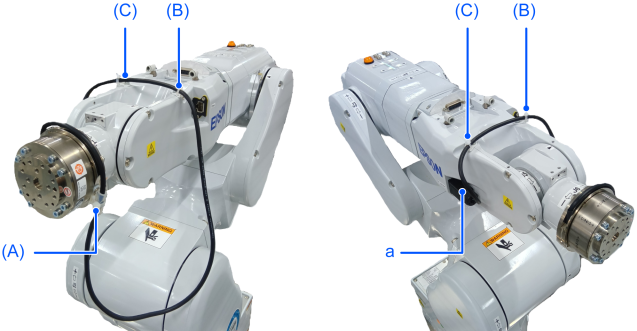
Length of A-B (excess length for rotation of J5 and J6): 475mm
| Symbol | Description |
|---|---|
| A-C | Binding part |
| a | F-sensor cable connector |
C8, C12 series Manipulator rough operation range
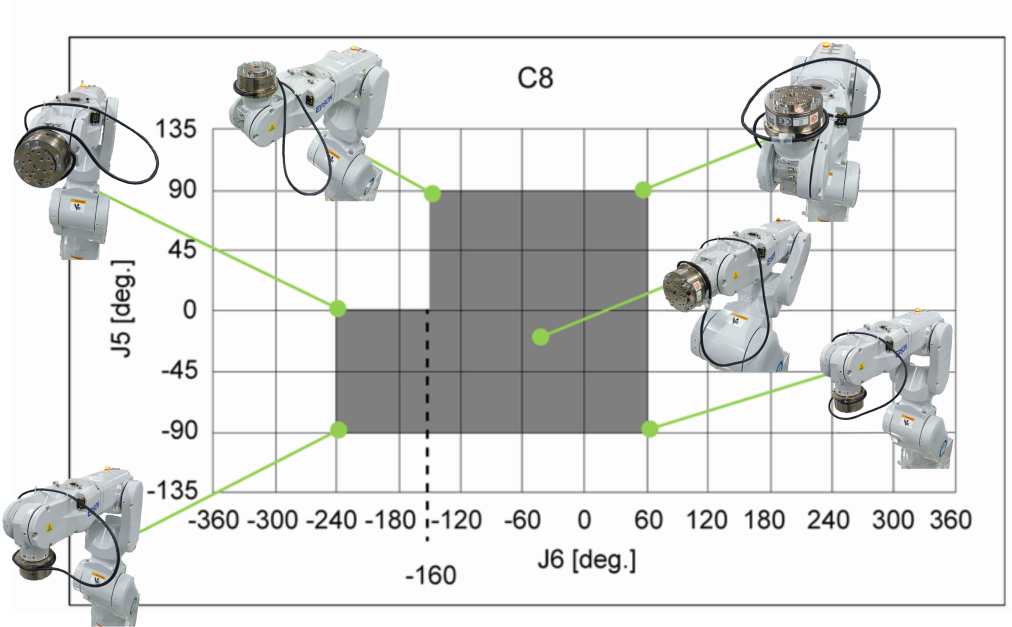
J5 | J6 |
|---|---|
| 0 to 90 deg | -160 to 60 deg |
| -90 to 0 deg | -240 to 60 deg |
CAUTION
The cables may deform during storage. Caution is required this regard. The cable's bend radius is at least five times larger than the cable diameter (R=30 mm or larger).
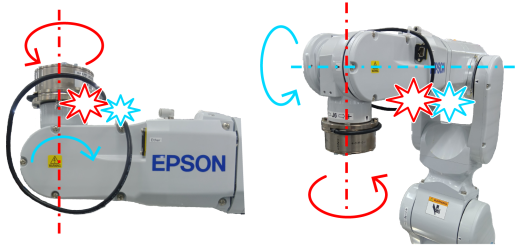
The cable may rub against the Manipulator as shown in the photos below depending on the Manipulator motion.
When routing the cable, be extra careful in this regard, and check to make sure the cable does not touch or rub against the Manipulator.
GX series, LS series-S2503, S2506, S25010
Wiring example 1: When using the D-sub
GX8, GX10, and GX20 series use the user connector D-sub (9-pin) to install the Force Sensor.
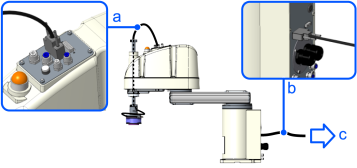
| Symbol | Description |
|---|---|
| a | Force Sensor cable |
| b | Force Sensor M/I connection cable |
| c | To Robot controller |
Wiring example 2: When using the cable duct, external wiring option, etc.
For GX4 series and LS series, install the cables on the exterior of the Manipulator using the cable duct.
When installing the cables outside the Manipulator, make sure to install the ground wire of the relay cable to the specified position on the Manipulator.
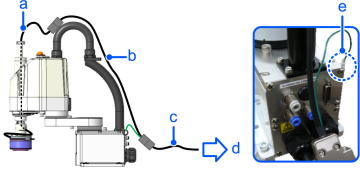
| Symbol | Description |
|---|---|
| a | Force Sensor cable |
| b | Relay cable for external wiring |
| c | Force Sensor M/I connection cable |
| d | To Robot controller |
| e | Ground terminal fixing position |
For GX8, GX10, and GX20 series, external wiring is available with the following option products.
Option product | Code | ||
|---|---|---|---|
| External wiring unit | GX8-***S | For Table top mounting /standard model | R12NZ901BY |
| GX8-***SR/SW | For Ceiling /Wall mounting /standard model | R12NZ901BZ | |
| GX10/GX20***S | For Table top mounting /standard model | R12NZ900GZ | |
| GX10/GX20***SR/SW | For Ceiling /Wall mounting /standard model | R12B031912 | |
| Relay cable | R12NZ900RW | ||
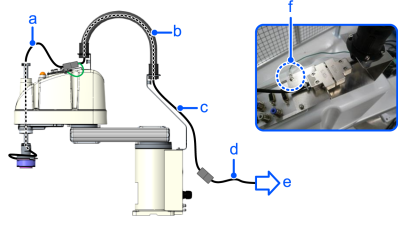
| Symbol | Description |
|---|---|
| a | Force Sensor cable |
| b | External wiring unit |
| c | Relay cable for external wiring |
| d | Force Sensor M/I connection cable |
| e | To Robot controller |
| f | Ground terminal fixing position |
Wiring example 1 and 2 use the attached cable mounts and wire ties for the following fixing parts A and B. For other parts, fix the cables according to the Manipulator motion.
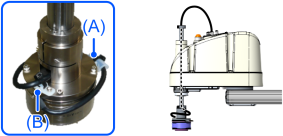
| A-B | Fixing part |
CAUTION
- The cables may deform during storage. Caution is required this regard. The cable's bend radius is at least five times larger than the cable diameter (R=30 mm or larger).
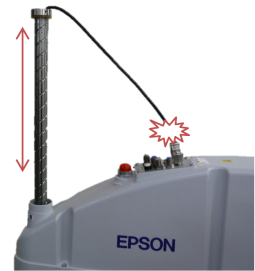
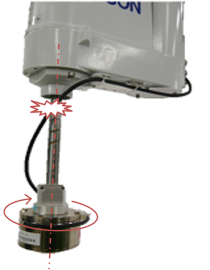
- The cable may rub against the Manipulator or get under tension as shown in the photo below depending on the Manipulator motion. When routing the cable, be careful in this regard and check if it touches and rubs against the Manipulator or is under tension.
RS series-S2503, S2506
RS series use the Ethernet cable connector of user connector to install the Force Sensor.
Wiring example 1: Common to RS4 and RS6
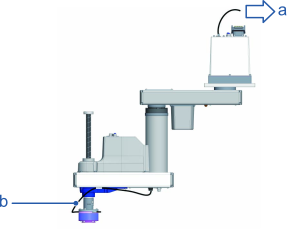
| Symbol | Description |
|---|---|
| a | To robot controller |
| b | Force Sensor cable |
Wiring example 2: Only RS6

| Symbol | Description |
|---|---|
| a | To robot controller |
| b | Force Sensor cable |
Wiring example 1 and 2 use the attached cable mounts and wire ties for the following fixing parts A and B. For other parts, fix the cables according to the Manipulator motion.
Length of A-B (Extra length for J4 rotation): RS4 350 mm, RS6 410 mm
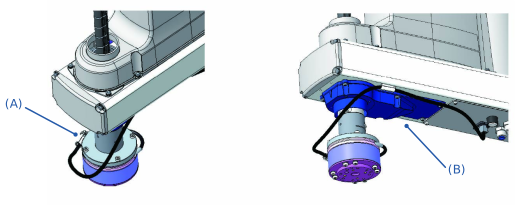
| A-B | Fixing part |
In the case of the wiring example shown above, set the Manipulator's motion within the range described below as a guide.
| J4 |
|---|
| + 180 deg |
| - 180 deg |
Connect the Force Sensor cable to the following connector.
- RS4 Ethernet cable connector A
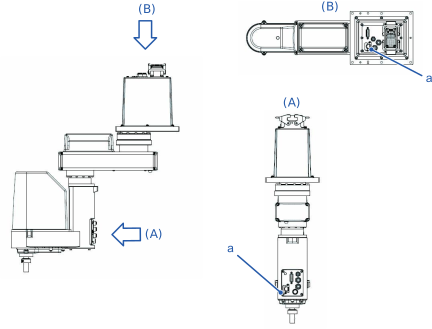
| Symbol | Description |
|---|---|
| A | User connector A |
| B | User connector B |
| a | User connector (RJ45 connector) |
- RS6 Ethernet cable connector A (Ether1) or C (Ether2)
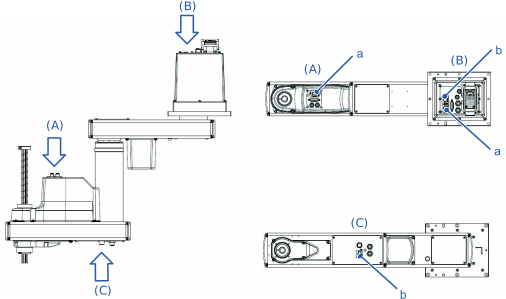
| Symbol | Description |
|---|---|
| A | User connector A |
| B | User connector B |
| C | User connector C |
| a | User connector (RJ45 connector No1) |
| b | User connector (RJ45 connector No2) |
CAUTION
- The cables may deform during storage. Caution is required this regard. The cable's bend radius is at least five times larger than the cable diameter (R=30 mm or larger).
- The cable may rub against the Manipulator or get under tension as shown in the photo below depending on the Manipulator motion. When routing the cable, be careful in this regard and check if it touches and rubs against the Manipulator or is under tension.
Key Point
For wiring example 2, it is recommended to use an external wiring unit.