Creation of OPC UA Client Program
Overview
Prerequisite: It is assumed that an OPC UA Client library (such as node-opcua library of Node.js, and opcua-asyncio library of python) will be used.
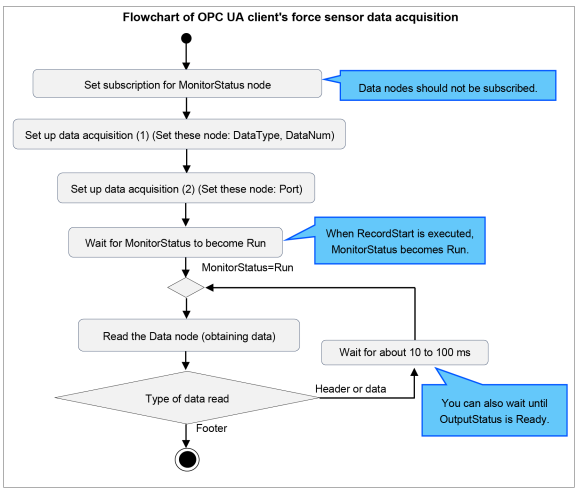
Creates an OPC UA Client program to acquire and utilize force sensor data with OPC UA. The data acquisition flowchart of the OPC UA client for acquiring the data for one RecordStart is shown below.
Selecting the data type
Set the DataType node to a value of 0 to 3 depending on the type of data you want to acquire. For the differences in the data that can be acquired, refer to the following.
Setting the maximum number of data items
The maximum number of data items to be acquired from the OPC UA Server at one time can be set in the DataNum node.
Do the above settings before setting up the Port node.
Selecting the data output destination
You can select either Epson RC+ or OPC UA as the output destination for data obtained by executing RecordStart. To output to OPC UA, set the Port node to True. Set the Port node before executing RecordStart.
CAUTION
Data can be output to either Epson RC+ or OPC UA, but not to both. Data cannot be acquired for both Epson RC+ and OPC UA simultaneously.
Start time of Data node reading
Execute Start Data node reading according to the status of the MonitoringStatus node as a judgement condition. MonitoringStatus nodes can also be registered for subscriptions. While the MonitoringStatus node value is Stop, standby as reading is not performed.
Alternatively, DataExistsStatus can be also used as a condition for deciding.
Data node reading
By referencing the data node, you can read the data described in the following chapters.
Read the header first. Read the multiple data parts next, and finally the footer to complete the process. Decode data as needed. Execute or end reading according to the value of the OPCUACommonTag.
CAUTION
- After executing RecordStart, continue to acquire data with OPC UA Client at intervals of several 10 to several 100 ms. If the reading interval of data node is too long, data may be missing. In that case, the ErrorStatus node will become Warning. If Warning occurs, check the time stamp and process the data appropriately.
- If you want to reduce the amount of missing data mentioned above, speed up the data acquisition cycle, change the data type using the DataType node, or increase the measurement interval specified in RecordStart.
- To ensure that the data is read, the Data node should not be registered for subscriptions.
End condition for Data node reading
End Data node reading when the read data's OPCUACommonTag is 4.
OPCUACommonTag=4 indicates that the footer was read.
KEY POINTS
To repeat RecordStart, repeat the above data acquisition flow.
Written in pseudo code, a program for acquiring data corresponding to one RecordStart is shown below. Create your program according to the usage of the OPC UA client library you use.
# Collect the force sensor data from OPC UA Server of Epson Robot Controller.
# * This is pseudo code.

# Create OPC UA Client
client = create_opcua_client()                  # Create OPC UA Client Instance
client.connect('opc.tcp://192.168.0.1:4840')    # Connect to OPC UA Server

# Get node object
node_DataType           = client.getNode('ns=1;i=196611')   # DataType Node
node_DataNum            = client.getNode('ns=1;i=196612')   # DataNum Node
node_Port               = client.getNode('ns=1;i=196609')   # Port Node
node_DataExistsStatus   = client.getNode('ns=1;i=196867')   # DataExistsStatus Node
node_MonitorStatus      = client.getNode('ns=1;i=196866')   # MonitorStatus Node
node_Data               = client.getNode('ns=1;i=196865')   # Data Node

# Setup necessary settings
node_DataType.setValue(0)       # set DataType
node_DataNum.setValue(1000)     # set DataNum
node_Port.setValue(True)        # set Port

# Start data collection
while node_MonitorStatus.getValue() is not 'Run':   # wait to RecordStart
    sleep(0.1)                                      # wait 100ms

while True:                                                 # loop for collect data
    while node_DataExistsStatus.getValue() is not 'Ready':  # wait to data Exists
        sleep(0.1)                                          # wait 100ms

   binary_data = node_Data.getValue()      # read force sensor data
    decoded_data = decode(binary_data)      # decode binary data to readable format
    writefile(decoded_data)                 # write data to file

    if binary_data[0] == 0x4:               # if Footer received,
        break                               # then end loop