Overview
If you use the node of the force sensor, you can acquire the force sensor data from OPC UA Client. The data you can acquire is the same with the one you can acquire when you connecting to Epson RC+.
Below is an example of a system configuration.
KEY POINTS
Data is output to either Epson RC+ or OPC UA.
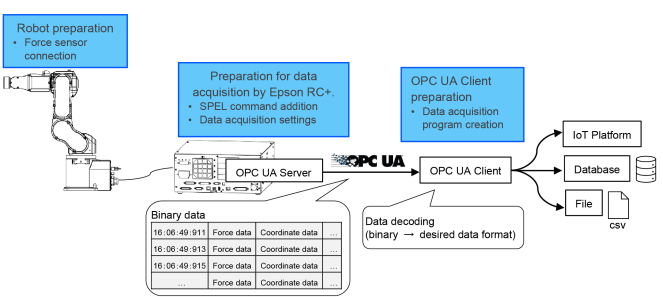
To use this function, prepare the three items below after completing the OPC UA Server configuration. For details, refer to the following.
- Robot preparation: Prepare a manipulator to which a force sensor can be connected and connect it to the force sensor.
- Creation of data acquisition program by Epson RC+: Add the “RecordStart” command to the SPEL program for using.
- Preparation of OPC UA Client: Create an OPC UA Client program to acquire data from the OPC UA Server. Convert acquired data to fit your system.