Outline
Robot system has two operation modes TEACH mode and AUTO mode.
TEACH mode
This mode enables point data teaching and check close from the Robot using the Teach Pendant.
Robot operates in Low power status.
Move the robot to the teaching position and assign it to the specified point number.
Move the robot by the following methods:
Jog motion:
Push the jog key to move the robot.
Direct Teach + Touch Jog operations:
Move the robot directly. Use Epson RC+ Option Force Guide.
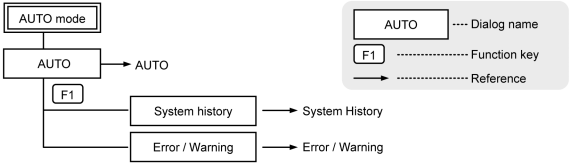
AUTO mode
This mode enables automatic operation (program execution) of the Robot system at the manufacture operation, besides, programming, debug, adjustment, and maintenance of the Robot system.
This mode cannot operate Robot or run program with the Safety Door open.
KEY POINTS
This product does not support a low speed program verification function (T1: manual deceleration mode) and high-speed program verification function (T2: manual acceleration mode) which is defined in Safety Standards.
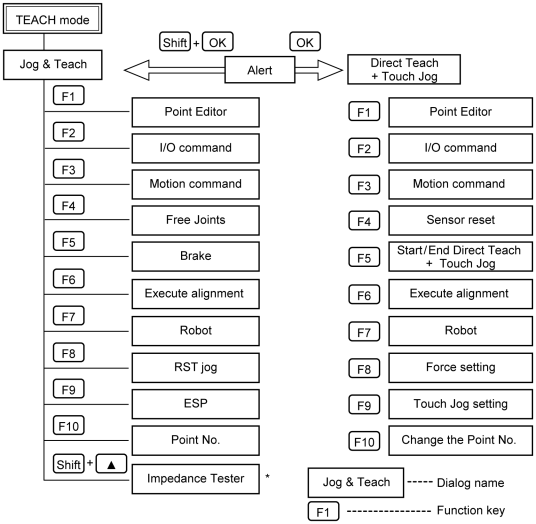
* The impedance tester is supported as default for EPSON RC+ 7.0 Ver. 7.2.0 or later. However, the impedance tester is available only when using Epson RC+ Option Force Guide.
When not using the Force Guide, the impedance tester is not available.
KEY POINTS
Direct Teach + Touch Jog function is supported as default for EPSON RC+ 7.0 Ver.7.4.4 or later, and Epson RC+ 8.0. However, Direct Teach + Touch Jog function is available only when using Epson RC+ Option Force Guide.
When not using the Force Guide, Direct Teach + Touch Jog function is not available.