Key Description
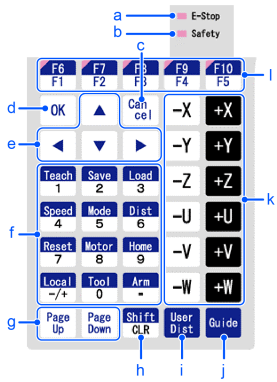
| Symbol | Description |
|---|---|
| a | E-Stop lamp |
| b | Safety lamp |
| c | Cancel key |
| d | OK key |
| e | Arrow keys |
| f | Number Input keys |
| g | Page Up / Down key |
| h | CLR key |
| i | User Dist key |
| j | Guide key |
| k | Jog keys |
| l | Function keys |
Number Input Keys
| Mode | Key | Function |
|---|---|---|
| Number input mode | 0 to 9 - / + . (period) | Number input |
| CLR | Clears a number. |
Teaching Keys
Teaching key is available only in TEACH mode.
| Key | Function |
|---|---|
| Teach | Saves the current position data |
| Save | Saves the point data to a file |
| Load | Loads the point data from a file |
| Speed | Specifies the Jog speed |
| Mode | Specifies the Jog mode |
| Dist | Specifies the Jog distance |
| Reset | Sets the initial setup status |
| Motor | Switches the motor power ON/OFF |
| Home | Moves the robot to home position |
Arrow Keys
| Key | Function |
|---|---|
| ▲ | Moves the cursor up |
| ▼ | Moves the cursor down |
| ◀ | Move the cursor to the left |
| ▶ | Move the cursor to the right |
Function Keys
The function keys (F1 to F10) are assigned to each screen.
To check the key assignment, press the [Guide] key.
TIP
Press the [Shift] key when F6 to F10 keys are enabled, it switches between the keys F1 to F5 and F6 to F10.
Example : Jog&Teach Screen
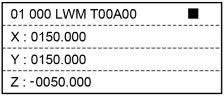
Guide
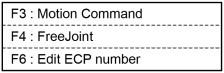
Example : Press the [F3] key to execute motion commands.
KEY POINTS
When no functions are assigned to a function key, the key is not available.
Example : [F5]
Jog Keys
Jog key is available only in TEACH mode.
| Key | Function |
|---|---|
| - | Moves the target joint (X to W, J1 to J6) to - direction |
| + | Moves the target joint (X to W, J1 to J6) to + direction |
Other Keys
| Key | Function |
|---|---|
| OK | Saves the setting and changes to the next screen |
| Cancel | Cancels the setting and goes back to the previous screen |
| Page Up | Changes to the previous page |
| Page Down | Changes to the next page |
Lamp
| Lamp | Function |
|---|---|
| E-Stop | Turns ON when an EMERGENCY STOP occurs |
| Safety | Turns ON when the safeguard is open |