How to use
Setting reference points
The area distortion correction function works inside the area set as the correction area. Therefore, reference points must be set to surround the operating point. The reference points are set for the robot.
For the reference points, use points whose positions relative to each other are precisely known. For example, use a reference hole of the device or a point with a tight position tolerance. Since corrections are made using the correspondence of taught points, the use of inaccurate reference positions may result in inaccurate correction results.
Increasing the number of reference points may improve accuracy.
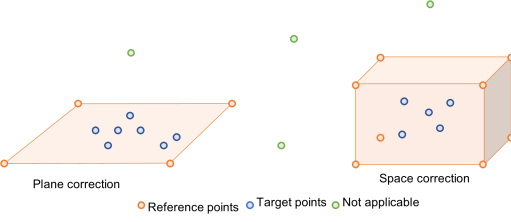
You can use Plane correction and Space correction.
- Plane correction
- Plane correction allows you to make corrections to points on a plane composed of the points you have selected as reference points. If plane correction is selected, place the refPointList on a plane. A minimum of three reference points is required.
- When plane is selected as the correction type, the effect of the correction is reduced at points vertically distant from the plane selected for Kind (the type of correction). Set the correction area at an appropriate height or, if a reference point can be established in the height direction, specify space for Kind (the type of correction).
- Space correction
- Space correction allows you to make corrections to points in three-dimensional space composed of the points you have selected as reference points. When selecting space correction, make sure that the refPointList surround the area to be corrected. A minimum of four reference points is required.
- Save the positions of the reference points on the drawing as point data. Point numbers must be continuous. For example, if you choose four reference points, prepare four contiguous areas in the point file.
- To correct point data using the area distortion correction function with a vertical 6-axis robot (including N series), the tool coordinate system's Z axis at the point to be corrected must match the tool coordinate system's Z axis at the reference point of the correction area. The angle formed by the tool coordinate system's Z axis can be acquired by specifying COORD_Z_PLUS as the axis number for the DiffToolOrientation function.
- With a SCARA robot (including RS series), correction is effective in any orientation.
- If you want to maintain high accuracy even at a point where the orientation has rotated in the tool coordinate system's Z-axis direction from the reference point, it is effective to add the rotated orientation point to the reference points.
Reference point teaching
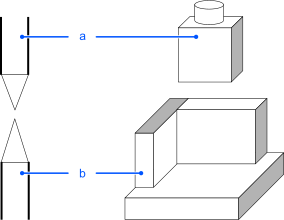
When teaching, use a method that will ensure as much accuracy as possible. For example, use a device-side reference point and a tool as shown in the figure below.
- Reference point: Teaching point is easy to be found
- Tool: Tip point is easy to be found
Correction of operating points
After teaching has been performed for all reference points, use AreaCorrectionSet to set the correction area. Set P1 to P4 as reference point positions on the drawing. Also, set P11 to P14 as the points where the reference points were actually taught. To set up a plane correction for correction area 1, set as follows:
AreaCorrectionSet 1, P(1:4), P(11:14), MODE_PLANE
If you want to apply the correction to operating point P20 in the correction area, write the following:
Go AreaCorrection(P20, 1)
For more information about each command, see the following manual:
"Epson RC+ 8.0 SPEL+ Language Reference"
CAUTION
Set the correction area for each tool. If the correction is performed using a tool different from the tool taught by area number, the position may be inaccurate.
The correction area is valid until the controller power is turned off.
To enable the correction area, execute AreaCorrectionSet on the points recorded in the point file.