Installing VR Unit
To read the VRT parameters accurately, install the VR unit to vibrating position to check the conditions. If the VR unit is installed on a position where generates little vibration, incorrect parameters will be output or output parameters will not be stable.
Use the following items to install the VR unit:
- Double-Sided Tape
- Screws
Installation by using double-sided tape
- Attach the double-sided tape directly to installation surface of VR unit.
- Attach the VR unit directly to vibrating position (flat surface).
- Check that the attached unit does not move to both sides.
KEY POINTS
If the adhesion of the double-sided tape is too weak, the measurement accuracy may decrease. Also, if it is too strong, the painted surface of the vibration object may be peeled. Make sure to check the adhesion before using the double-sided tape.
Use “normal type” of the double-sided tape for commercialized product.
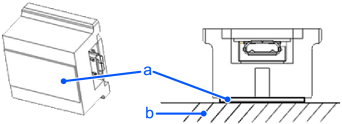
| Symbol | Name |
|---|---|
| a | Double-sided tape |
| b | Installation surface |
Installation by using screws
Mount the screw* to the screw hole of the vibrating position. Firmly tightening it by using spanner.
* Screws (M3, M4×1) are included. Use proper screw for your screw hole.
Screw and fix the tightened screw at step 1 to the screw hole of the VR unit.
Fix the VR unit tightly with the nut by using spanner.
KEY POINTS
Screw the VR unit approximately three times to the fixed screw at the step 1. Make sure that the VR unit is stable and does not move or rotate.
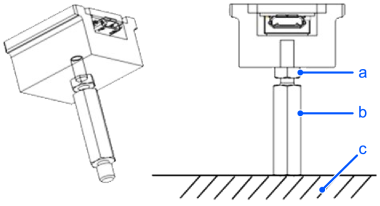
| Symbol | Name |
|---|---|
| a | Nut |
| b | Screw (hexagon strut) |
| c | Installation surface |