VStatsShow Statement
Applies To
Vision Sequence
Description
Displays statistics for a specified sequence.
Usage
VStatsShow Sequence
- Sequence
- Name of a sequence or string variable containing a sequence name.
Remarks
VStatsShow will display a dialog showing the statistics for all objects in the specified sequence.
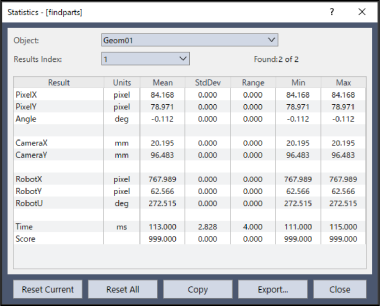
| Operation button | Description |
|---|---|
| Object | Dropdown list for selecting which object to review statistics for. |
| Found | Displays the number of times the object was found vs. the number of times it was run. For example, “5 of 6” means the object was run 6 times and found 5 times. |
| Reset | Deletes the statistics of the selected Object. This clears all data. |
| ResetAll | Deletes the statistics for all vision objects in the sequence. This clears all data. |
| Close | Closes the [Statistics] dialog box. All data of the results will remain. |
| Copy | Copies the statistics to the clipboard. |
| Export | Exports the statistics into a CSV file. |
| Result Number | Select the results to display. |
Example
VStatsShow Seq1
See Also
VStatsReset Statement, VStatsResetAll Statement, VStatsSave Statement