Motor
To operate the robot, turn the motor "ON".
Turning the motor "ON" will enable you to operate the jog panel.
Tapping motor icon allows you to configure the following settings:
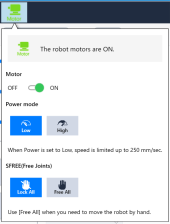
- Motor: ON/OFF
- Power Mode: Low/High
- SFREE (Free Joint): All joints locked/all joints unlocked
KEY POINTS
SFREE (Free Joints) allows you to move robot by hands by changing all joints locked to free. Available to change setting regardless motor ON/OFF. When the motor is ON and the system is in SFREE mode,  will be displayed.
← Jog Screen 3D View →