Setting a Program Operation
On this screen, you can set default values such as speed for each path type. The default values set here will be reflected in the move command.
Tap [Settings] to show operation setting screen.
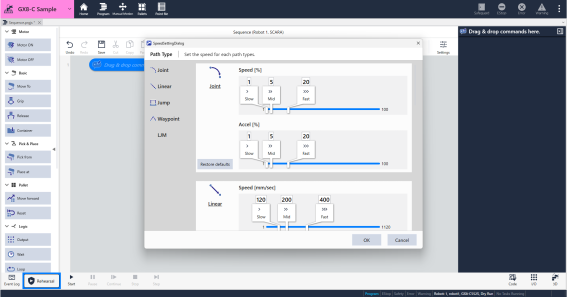
Joint, Linear, Jump
You can set the operating speed for each path type.
Move the knob for the path type you want to set and then set the values for [Speed] and [Acceleration/Deceleration].
[Jump] is only available when a SCARA robot is selected. Additionally, the [Jump] function allows you to set the LimZ.Waypoint
You can set waypoints when using the pick/place command.
As you approach your destination, you will pass through the location specified here.LJM
Selecting "Enable short-distance movement" from the dropdown menu will cause the robot to move in a way that minimizes the change in its posture from its starting position.
If you select "Disable short-distance movement", the robot will move while maintaining its taught posture.