Installing the Hand
Create the hand for your Manipulator. For details on installing the hand, refer to the following manual.
“Epson RC+ 8.0 Hand Function”
The flange dimensions at the end of Arm #6 is as below.
CAUTION
If you use a hand equipped with a gripper, make sure to connect wires and/or use pneumatic tubes so that the gripper does not release the workpiece when the power to the robot system is turned OFF. Improper connection of the wires and/or pneumatic tubes may damage the robot system and/or workpiece as the workpiece is released when the Emergency Stop switch is pressed. I/O outputs are configured at the factory so that they are automatically shut off (0) by power disconnection, the Emergency Stop switch, or the safety features of the robot system.
However, the I/O set in the hand function does not turn off (0) when the Reset command is executed or in emergency stop.
Wrist flange
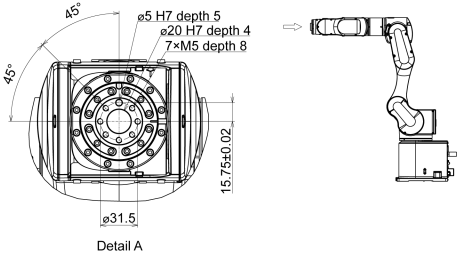
Arm #6
Attach the hand to the end of the Arm #6 using the M5 bolts.
Layout
When attaching and operating a hand, the hand may come into contact with the Manipulator body due to the outer diameter of the hand, the size of the workpiece, or the position of the arm. Carefully consider the interference area of the hand when designing the system layout.