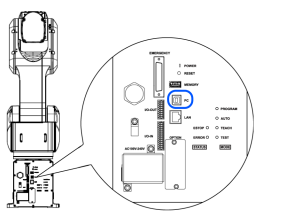
Development PC Connection Port
KEY POINTS
- For other details on the connection between the development PC and the Manipulator, refer to the following.
"Epson RC+ User's Guide - [PC and Controller Communications] (Setup Menu)" - Be sure to install the Epson RC+ to the development PC first, then connect the development PC and Manipulator with the USB cable.
If the Manipulator and the development PC are connected without installing the Epson RC+ to the development PC, [Add New Hardware Wizard] appears. If this wizard appears, click the [Cancel] button.