LED
Six LEDs are located on the Manipulator.
LEDs (ERROR, E-STOP, TEACH, TEST, AUTO, PROGRAM) turn ON according to the Controller status (error, Emergency Stop, TEACH mode, Auto mode, Program mode).
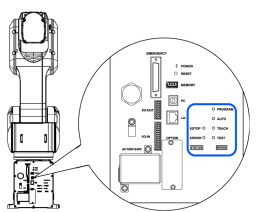
| Controller status | LED display |
|---|---|
| Saving the Controller state to the USB memory device | TEST, TEACH, AUTO, and PROGRAM blink |
| Start up (Required time is different depending on the connection status of the device.) | 1. TEST, TEACH, AUTO, and PROGRAM blink (for 15 seconds) 2. All turn OFF (10 seconds) 3. All turn ON (to 10 seconds ) 4. All turn OFF (10 to 30 seconds ) 5. Either of TEACH, AUTO, or PROGRAM turns ON |
| Complete Controller status storage to USB memory | TEACH, AUTO, PROGRAM turn ON (for 2 seconds). ERROR turns OFF even if an error occurs. |
| Failed to save Controller state to the USB memory device | ERROR, TEACH, AUTO, PROGRAM turn ON (for 2 seconds). |
| Error state | ERROR turns ON |
| Warning state | ERROR blinks |
| Emergency stop state | E-STOP turns ON |
| TEACH mode | TEACH blinks |
| Auto mode (AUTO mode) | AUTO blinks |
| Program mode (AUTO mode) | PROGRAM blinks |
| Power supply drop | TEACH, AUTO turn ON |
| TEST mode | TEST blinks |