Settings from Epson RC+
This section describes the procedure for entering automatic operation mode from Epson RC+.
- In the Epson RC+ menu, select [Setup] - [System Configuration] to display the [System Configuration] dialog box.
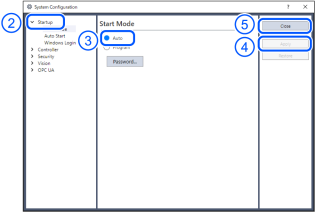
- Select [Startup].
- Select [Start Mode]-[Auto] button.
- Click the [Apply] button.
- Click the [Close] button.