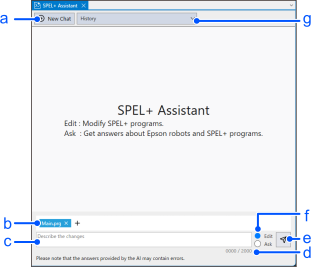
| Symbol | Item | Description |
|---|
| a | New Chat Button | Clears the previous chats and starts a new one. |
| b | Input files box | Selects the program files to include in the context. |
| c | User prompt input box | Input the user prompt |
| d | Character Counter | Displays the number of characters in the currently entered user prompt. |
| e | Send/Cancel Button | Sends the user prompt and starts generating answers. The button switches to the [Cancel] button while the response is being generated and cancels generating response. |
| f | Edit/Ask Selection Button | Selects [Edit] or [Ask]. |
| g | History Dropdown List | Selects and displays the chat history. |