Manual Assistant Initial Screen
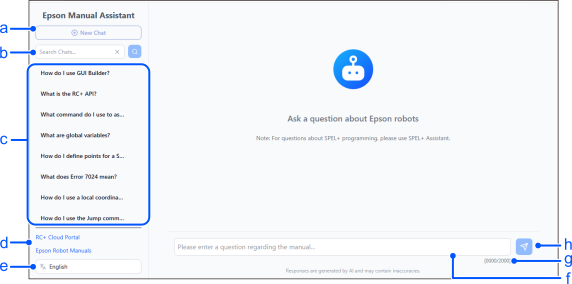
| Symbol | Item | Description |
|---|---|---|
| a | New Chat Button | Clears the previous chats and starts a new one. |
| b | Search Box | Input the characters to search and search the chat’s history. |
| c | History List | A list of the chat’s history. The selected chat is displayed when clicked. |
| d | External Link List | A link to external sites. |
| e | [Language Selection] Drop-down List | Select the language to display on the screen. However, this does not change the language that AI uses to respond. Response from the AI will be displayed in the language that was input in the user prompt. |
| f | User prompt input box | Input the user prompt |
| g | Character Counter | Displays the number of characters in the currently entered user prompt. |
| h | Send/Cancel Button | Sends the user prompt and starts generating answers. The button switches to the [Cancel] button while the response is being generated and cancels generating response. |